Product description
What’s in the Box
- 1 × Dual-screen monitor setup (P2 Pro)
- 1 × Carrying bag
- 1 × Quick start guide
- 1 × USB Type-C to USB Type-C cable
- 1 × USB Type-C to USB Type-C (extra, for power support)
- 1 × USB Type-C to dual USB-A cable
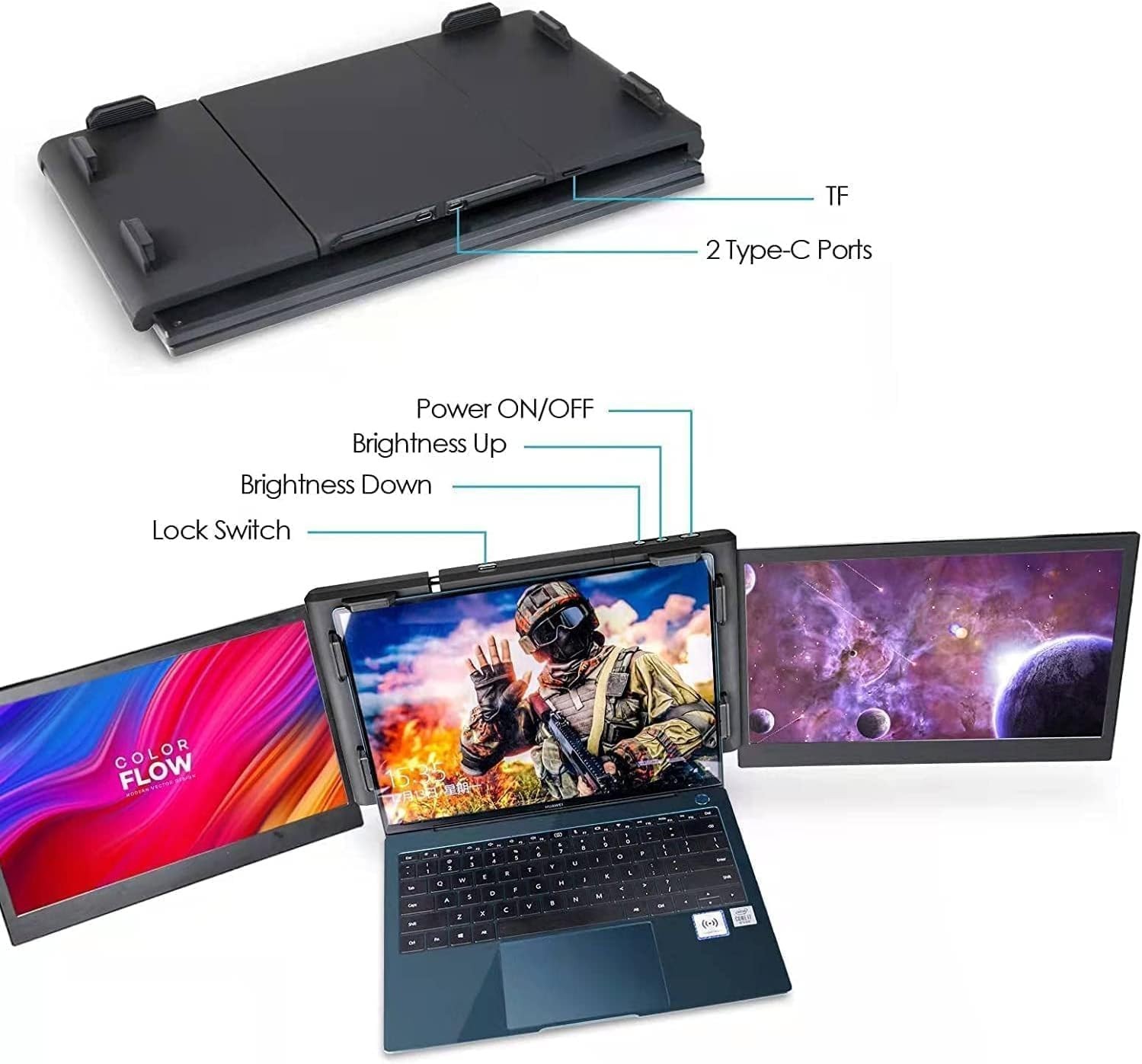
Know Your Ports
- USB-C Port— for video and data signal
- USB-C PD Port— for external power input (if needed)
- TF Card Slot— contains the preloaded driver
Compatibility Checklist
To use this monitor, your laptop must meet one of the following conditions:
Option 1: USB-C Laptop (Full-Featured, 5V/2A Output)
✔ Use onlyone USB-C to USB-C cable(included)
✔ No adapter or extra cable needed
Option 2: USB-C Laptop (Low Power or Unstable Signal)
✔ Still works — just connect the second USB-C cable to a5V/2A power source
- Power adapter not included
Option 3: Laptop with No USB-C Port
✔ Use theUSB-C to dual USB-A cable
✔ Plug thered USB-A headinto a 5V/2A power source (adapter or laptop USB-A with power)
- Most phone/tablet adapters work fine (5V/2A output)
Quick Setup Steps
1. Mount the Monitor
- Expand the frame and attach it to your laptop. Use the built-in stand for support.
2. Connect the Cables
- Use the right cable setup based on your laptop type (see Compatibility Checklist).
3. Install the Driver
- The driver is preloaded on the TF card (already inserted)
- Open the drive that appears on your laptop
- Run the installer for your system
- Temporarily disable antivirus software if install is blocked
Need Help?
Not sure if your laptop is compatible? Having trouble setting up?
We're here for you — just reach out and we'll walk you through it.