Compatible Aftermarket Toner TN229XL Compatible 5-Pack for Brother (High Yield) – MyCartridge – New Sealed
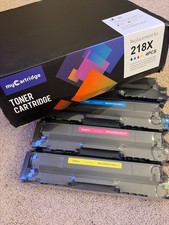
Includes 2 Black + 1 Cyan + 1 Magenta + 1 Yellow – High Page Yield.
Condition
Condition: New. All toner cartridges are factory sealed except for one of the two black units, where the outer seal appears re-applied.
- Brand: Compatible aftermarket (MyCartridge)
- Model: TN229XL high-yield series
- 5-Pack Set:
- 2 × Black
- 1 × Cyan
- 1 × Magenta
- 1 × Yellow
- High-yield page output
- For Brother printers using TN229 / TN229XL cartridges
About This Toner Set
This is an aftermarket compatible TN229XL high-yield toner 5-pack designed for use in select Brother laser printers. These cartridges are new and unused, with one of the two black units showing a re-applied plastic wrap.
Some Brother printers may require firmware settings to be adjusted when using replacement toner. An instruction sheet is included explaining how to disable automatic firmware updates to avoid compatibility issues.
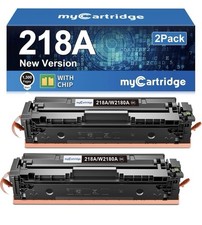
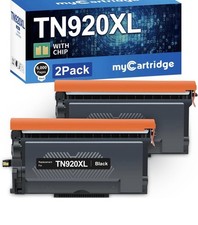
Important: Unlike some online listings, the packaging does not explicitly state that compatible chips are installed. Buyers should assume this set is standard aftermarket toner requiring compatibility settings such as disabling automatic firmware updates if prompted by the printer.
Key Features
- Compatible aftermarket toner for Brother printers.
- High-yield output reduces replacement frequency.
- Vivid color reproduction and deep black text.
- Cost-effective alternative to Brother OEM cartridges.
- Instruction sheet included for best install practices.
Specifications Brand Compatible / MyCartridge Model TN229XL Set Contents 2× Black, 1× Cyan, 1× Magenta, 1× Yellow Condition SEALED New – one black cartridge with re-applied seal Included Installation instructions for best printer compatibility Compatible Brother Printers
Works with printers that use TN229 / TN229XL toner. Including Brother HL-L3220CDW, HL-32240CDW, HL-L3280CDW, and HL-L3295CDW. Please confirm compatibility with your specific model before purchase.
Important Setup Instructions
Some Brother printers may block third-party toner after firmware updates. The included instruction sheet explains how to disable automatic firmware updates, typically through:
- Control panel settings on the printer
- Brother desktop software settings
- Network settings preventing background firmware installation
Disabling updates ensures maximum compatibility with aftermarket toner.
📦Shipping & Logistics 🍁Canada Domestic Standard International 🌎 International Canada Post Expedited Services • 2–6 Business Days
• 1-Day Handling
• Tracked & Insured Chit Chats Tracked Services • 3–6 Business Days
• Direct to All 50 States
• DDP: No Customs Fees International (eIS) Services • USA, UK, EU, AU & More
• 7–14 Business Days
• Tracked - Fully Managed by USA Shipping Options & Customs Policy
For our U.S. Customers, we offer two distinct shipping methods at checkout. Please choose the one that best fits your needs:
OPTION 1: Standard Int'l (Chit Chats DDP)
- Delivery: 3–6 Business Days
- Customs: 100% Prepaid by us (DDP)
- Fees:$0.00 due at your door
- Guarantee: NO FEES or C.O.D
- Carrier: Clears border via Chit Chats; Final mile by USPS/UPS
⚠️Please, ignore 's default import fees warnings when choosing Standard Int'l Shipping. OPTION 2: International (eIS)
- Delivery: 7–12 Business Days
- Customs: Managed by
- Fees:PREPAID: Import fees collected at checkout
- Protection:Fully backed by 's Global Shipping protections.
⚠️ U.S. BUYERS: To avoid surprise carrier bills, we strongly recommend selecting "Pay import charges now " at checkout, rather than deferring them. 🌎 Global & International Policy (Non-USA)
We use International Shipping for all non-US destinations currently supported ( UK, EU, Norway, Switzerland, Australia):
- VAT/GST: Collected by at checkout for most major regions.
- Doorstep Fees: Per regulations, some local authorities (France, Spain) may apply a small (~€2) fee at delivery.
Professional Service • Secure Packaging • Tracked Delivery
Proudly shipping from Canada. We appreciate your business!