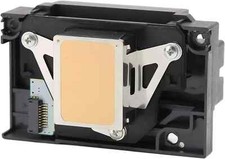
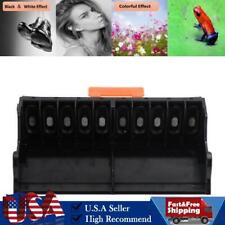
TX800 F192040 Dx10 Dx11 Printhead Print head For Epson or China Brand UV Printer
116.59 USD
Free Kind Reminder – Printhead Installation & Ink Flow Instructions
After installing the printhead, you may notice small gaps or missing lines on the test page.
This is completely normal — the ink needs some time to flow smoothly.
🛠 Recommended Steps: Deep Cleaning Procedure
Please follow these steps on your printer:
Press Settings
Go to General Setup → Press OK
Select Maintenance → Press OK
Choose Print Head Cleaning → Press OK
Select:
🔘 Black only
🔘 Colour only
🔘 All → Press OK
Choose Cleaning Strength:
🟢 Normal
🟡 Strong
🔴 Strongest
Press Start – The machine will begin cleaning the printhead.
🕒 After Cleaning:
Leave the printer powered ON and idle (do not use it)
Let it sit for at least 6 hours
After the waiting period, print multiple test pages
✅ In most cases, print quality will return to normal
🔁 Still Not Perfect?
If minor imperfections remain, perform a second deep cleaning cycle.
💬 If you have questions about this process or run into issues, feel free to contact us via messages — we're here to help!
🔧 Troubleshooting & Installation Precautions
Please read carefully before purchasing or installing a new printhead. Proper handling can prevent damage to your printer and extend the life of your printhead.
❗ 1. Red Light Flashing When Powering On
This does not necessarily mean the printhead is faulty.
➡ The issue may come from the printer frame or mainboard.
✅ Please fix any error codes or system issues before replacing the printhead.
❗ 2. Printer Does Not Detect Cartridges
This is often due to a blown fuse on the mainboard.
🔧 Solution: Replace the mainboard or its fuse.
🔍 3. Check the Data Cable
Before installation, check if the data cable is:
🔥 Burned
⚡ Corroded
🚫 Loosely connected
A damaged or unstable cable can burn the printhead and the mainboard.
✅ Please ensure your cable is in perfect condition before proceeding.
💧 4. Use High-Quality Ink & Cartridges
The lifespan of your printhead depends heavily on the quality of ink used.
🛡 We recommend using premium ink, cartridg
🔧 Kind Reminder – Printhead Installation & Ink Flow InstructionsAfter installing the printhead, you may notice small gaps or missing lines on the test page.
This is completely normal — the ink needs some time to flow smoothly.
🛠️ Recommended Steps: Deep Cleaning ProcedurePlease follow these steps on your printer:
Press Settings
Go to General Setup → Press OK
Select Maintenance → Press OK
Choose Print Head Cleaning → Press OK
Select:
🔘 Black only
🔘 Colour only
🔘 All → Press OK
Choose Cleaning Strength:
🟢 Normal
🟡 Strong
🔴 Strongest
Press Start – The machine will begin cleaning the printhead.
🕒 After Cleaning:Leave the printer powered ON and idle (do not use it)
Let it sit for at least 6 hours
After the waiting period, print multiple test pages
✅ In most cases, print quality will return to normal
🔁 Still Not Perfect?If minor imperfections remain, perform a second deep cleaning cycle.
💬 If you have questions about this process or run into issues, feel free to contact us via messages — we're here to help!
🔧 Troubleshooting & Installation PrecautionsPlease read carefullybefore purchasing or installinga new printhead. Proper handling can prevent damage to your printer and extend the life of your printhead.
❗ 1. Red Light Flashing When Powering OnThisdoes not necessarily mean the printhead is faulty.
➡️ The issue may come from theprinter frame or mainboard.
✅ Please fix any error codes or system issuesbefore replacing the printhead.
❗ 2. Printer Does Not Detect CartridgesThis is often due to ablown fuse on the mainboard.
🔧 Solution: Replace themainboardor itsfuse.
🔍 3. Check the Data CableBefore installation, check if the data cable is:
🔥 Burned
⚡ Corroded
🚫 Loosely connected
A damaged or unstable cable canburn the printhead and the mainboard.
✅ Please ensure your cable is inperfect conditionbefore proceeding.
💧 4. Use High-Quality Ink & CartridgesThelifespan of your printheaddepends heavily on the quality of ink used.
🛡️ We recommend usingpremium ink, cartridges, or CISS systemsto ensure stable performance and avoid clogging or damage.
Special statement
We have an ample supply of all items in our store. If you require additional quantities, please do not hesitate to contact us. Furthermore, if you need any other parts that are not listed in our inventory, please feel free to reach out to us. We offer a wide range of printer accessories, some of which may not be currently listed. Simply send us a message, and we will assist you in finding the specific item you need.
SHIPPING & HANDLING
International Post Airmail:
We charge a fixed fee for Shipping & Handling, which covers packing, warehousing, distribution, order handling, and processing expenses. Upon receiving payment, we will ship the item to you within 24 hours. The parcel containing the item will be sent from either Hong Kong or China via Flat Air Mail or Registered Air Mail.
Typically, delivery takes 1-2 weeks (maximum 3 weeks). U.S. customers: taxes are included.
We kindly request your understanding that the shipping charge encompasses various costs beyond the actual shipping expenses, such as stock fees, human resources, PayPal fees, final value fees, listing fees, insurance fees, packaging material fees, handling fees, and more. Your support in accepting the shipping charge is greatly appreciated as it enables us to continue providing quality service.
PAYMENT METHODS
We accept most payment method. If you have payment problem, please send a message to contact us. In normally, we will reply you in 24 hours in working days. Payment should be madewithin 14dayssince the winning of the first item.
Non-paying winners will be reported to . Serious buyers only please.Please email us with any questions you may have during the transaction.
TERMS OF SALES
Our top priority is customer satisfaction. All products undergo quality checks and are in good condition when shipped to our customers. In the event of a defective or damaged product upon arrival, or if the wrong product was shipped, please contact us immediately. Returns are accepted within 30 days of the delivery date, provided the item is in its original new condition with attached tags and packaging intact. Please note that altered or worn items cannot be returned. Return shipping costs are the responsibility of the buyer.
Please contact us first if you have any problems/questions/concerns. We will be happy to resolve any issues you may have in a cordial and friendly manner.
Your positive response is highly appreciated, and we will reciprocate the same. We kindly request that you refrain from leaving negative response without communicating with us first. Please allow up to 1 business days for us to respond.
CONTACT US
Please use "Ask Seller a Question" link to contact us for any queries. We normally reply to every message within 24 hours.
If you print a test page and notice some lines are missing, don't worry. This could be due to air entering the print head pipe during transportation, or there might be air trapped in the ink cartridges or the Continuous Ink System (CIS).
If you're using a CIS (Continuous Ink System), please ensure it's positioned higher than the printer by at least 2cm. You may observe ink leaking into the ink cartridges, followed by the print head entering standby mode. After 2 minutes, adjust the CIS to the same level as the printer, attempt to clean the print head, and you should see an improvement in the test page with some lines appearing. If you require high-quality printing immediately, continue cleaning. If the printing quality is acceptable, keep the printer powered on and in standby mode. After 24 hours, the quality should improve. As you continue printing, the quality will gradually improve even further.
If you're using ink cartridges, please power on the printer and keep it in standby mode. After 24 hours, try executing the print head cleaning function. Standby for 30 minutes, clean the print head, standby for another 30 minutes, clean the print head again, and repeat this process. You'll notice the printing quality improving with each cycle.
If you have any questions, please don't hesitate to message may also like
140mm blue scraper rake printhead cleaning wiper fits for Epson xp600 TX800 5113
17.69 USD
Free shipping
Print Head Printhead Fits For EPSON 635K EPSON 635KII 630k LQ630K 80KF
32.64 USD
Free shipping
Printhead carriage holder C101 fits for EPSON ME300 ME2 ME32 ME33 ME30 ME600F
17.99 USD
Free shipping
Printhead carriage WF-7721 fits for Epson wf7720 wf-7720 wf7611 wf7111 wf7620
34.99 USD
Free shipping
Printhead Fits For EPSON LQ1900K2+ 1900K2H LQ1900K2 LQ2190 LQ2180 2180 LQ1900K2H
46.48 USD
Free shipping
Printhead manifold 3890 3885 fits for epson pro 3800 3850 3880 B310 B510 B318
34.99 USD
Free shipping
Dx7 F196000 Print Head Fits For Epson P600 P608 P808 P800 3880 3885 3890 PX-5V
634.99 USD
45.0 USD
Printhead carriage P408 fits for Epson p607 P400 P600 P608 sc-p408
44.99 USD
Free shipping
Print Head Printhead Fits For EPSON 735KII 630kII 735K 80KFII LQ730k 82KF 630kii
33.8 USD
Free shipping
Print Head Printhead Fits For EPSON 660K 670K+t 670K printer parts
32.64 USD
Free shipping
Printhead cable buckle fits for Epson L3150 L3119 L3118 L1110 L3158 L3116 L3108
13.99 USD
Free shipping
Printhead carriage WF7610 fits for EPSON 7611 WF-7620 WF-7110 7111 WF-7621
36.76 USD
Free shipping
Beacon print head straps 188A fits for epson C31C516153 U220PA TM-U220PA
16.0 USD
Free shipping
Printhead carriage 3890 fits for Epson 3880 3885 pro3890 3850 3800
61.99 USD
Free shipping
Print Head Printhead Fits For EPSON LQ300KH LQ520K 300KH 520K LQ350 LQ310
31.26 USD
Free shipping
Printhead carriage WF-7710 fits for Epson WF-7218 WF-3641 WF-7718
32.99 USD
Free shipping
Printhead Carriage fits for Epson XP-15081 XP-15000 XP-15050 XP-15010 XP-15080
48.89 USD
Free shipping
Oil-based printhead print head F173050 fits for Epson R380 R260 R265 A1500W A920
124.99 USD
Free shipping
Printhead Carriage fits for Epson WF 5621 WF-5620 5620 WF-5621 WF-5623 5623
34.99 USD
Free shipping
Print Head Printhead Fits For EPSON 20K PLQ 90K LQ30K 30K LQ90KP
46.99 USD
Free shipping
Printhead carriage holder fits for EPSON 1100 TX525 ME1100 B1100 WF1100 C110
14.99 USD
Free shipping
F186000 unlocke printhead Fits For EPSON 7880C R2000 R2880 4880C R1900 9880C
740.49 USD
45.0 USD
Printhead carriage cable fits for Epson L3160 L3118 L3116 L3108 L3119 L3150
18.99 USD
Free shipping
Print Head Printhead Fits For EPSON 3250K 3500K DLQ
57.99 USD
Free shipping
Printhead Fits For EPSON 595KII LQ-1600KIVH 590K2 LQ-136KWII LQ-595KII 590KII
64.11 USD
Free shipping
Printhead capping unit cap top xp-102 fits for Epson XP211 XP212 tx430 SX440
21.99 USD
Free shipping
Printhead Rack 7880 Fits For Epson 4800 4800c 9800c 7000 9800 7800c 7450
34.99 USD
Free shipping
Printhead cable P408 fits for Epson P608 P400 P600 p607 sc-p408
24.99 USD
Free shipping
Print head cable 3890 for Epson P600 3880 3885 3800 3800C 3850 3850 P800 3800
43.99 USD
Free shipping
Print Head Printhead Fit For EPSON 680K 1600K3+ 1600KIII+ 680 LQ2070+ LQ680K pro
32.64 USD
Free shipping
Printhead carriage PX-5V fits for Epson R3000
44.99 USD
Free shipping
Print Head Printhead Fits For EPSON LQ610K 615K2 610KII 615KII 610k2 615K
32.64 USD
Free shipping
Print Head Printhead Fits For EPSON 300K2 1600KII LQ300k LQ300K+2 LQ300K+II
31.5 USD
Free shipping
Printhead carriage xp-102 fits for Epson XP214 SX445 XP211 ME570W tx430 XP202
24.99 USD
Free shipping
Printhead fits for Epson WF7611 WF7111 WF7610 WF7621 WF3641 WF3640 WF7720 WF7620
82.99 USD
Free shipping
Printhead Print Head Fits For EPSON M4015DN M4525DNF M4095DN WP-M4011 M4595DNF
54.99 USD
Free shipping
Print Head Fits For EPSON LQ590K LQ-1600K3H 680K2 136KW 2090K LQ1600K3H 106KF
32.64 USD
Free shipping
Print Head Printhead Fits For EPSON 790k EPSON790K printer parts
34.95 USD
Free shipping
Black scraper rake printhead cleaning wiper fits for Epson 4720 5113 TX800 XP600
11.39 USD
5.0 USD
PRINTHEAD fits for EPSON L6171 L6160 L6178 L6180 L6161 L6198 L6176 ET3750 L6190
74.99 USD
Free shipping
blue scraper rake printhead cleaning wiper blade fits for Epson 4720 TX800 XP600
11.39 USD
5.0 USD
Print Head Printhead Fits For EPSON TM-U220PA U220B U220PD u220d 220PD TM220
17.99 USD
Free shipping
Print Head Cable PX-5V Fits For Epson R3000
44.99 USD
Free shipping
Print Head Cable fits for Epson XP-15081 XP-15050 XP-15010 XP-15000
27.99 USD
Free shipping
Printhead cable L801 fits for Epson l801 801 L801
24.99 USD
Free shipping
Printhead carriage WF2750 fits for EPSON WF-2651 WF-2660 WF-2661 WF-2750 WF2650
25.09 USD
Free shipping
Print Head Cable fits for Epson WF-5620 5620 5623 WF 5621 WF-5621 WF-5623
34.97 USD
Free shipping
Printhead carriage L805 fits for Epson L810 L800 L801 L850 L805
45.36 USD
Free shipping
Printhead carriage T3180N fits for EPSON T3180N
144.93 USD
Free shipping
Oil-based printhead print head F173050 fits for Epson RX560 A1430 R270 rx690
124.99 USD
Free shipping