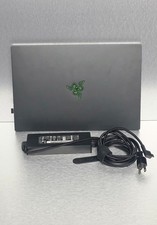
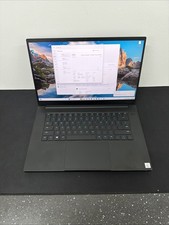
Razer Blade Base 15 (2020) 1TB Laptop - 1660 Ti - New battery & thermal paste For Sale
When you click on links to various merchants on this site and make a purchase, this can result in this site earning a commission. Affiliate programs and affiliations include, but are not limited to, the eBay Partner Network.
Razer Blade Base 15 (2020) 1TB Laptop - 1660 Ti - New battery & thermal paste
Price: US $315.00
Laptop works and runs gamesproficientlythat aren't very demanding.Laptop has no cosmetic wear or tear except for a tiny ridge by the W key and faded metal next to the trackpad. Upgrades performed:
Replaced battery. New battery is not bloated and works normally, but this model is designed to be used plugged in.
Replaced thermal paste, which solved the issue with the temperatures of the laptop after 5 years of use.
Upgraded to 1TB storage (from500GB storage).
Disclosed Issues:
The internal cooling fans are currently experiencing an issue where they repeatedly pulse on and off every few seconds or so. It doesn't always happen, and setting the fans to a custom speed in Razer Synapse can sometimes solve the problem. This issue doesn't seem to affect the performance, but it's very annoying to hear without headphones.
Trackpad does not work very well and a mouse is recommended.
Webcam doesn't work.
The internal motherboard battery (ML1220 3V rechargeable cell) is dead. Because of this, the laptop resets its system clock whenever it is completely unplugged from power. If you choose to run Windows with secure boot on, this reset will trigger a security recovery key prompt on boot, which simply means that you'll have to provide it with a security key from a thumb drive once, and it will last you until the computer is fully unplugged again from power. If you run Windows with encryption toggled off (has risks), it boots straight to the desktop normally. Another solution would be to just replace the battery of the motherboard which is only around $4, but you may need it done at a computer repair shop.
Screen has what can only be described as a backlight tear, which just looks like a very minor tear/slit that lets more light through. It's only noticeable when paying attention to the specific spot, which is in the lower right hand corner. It's almost impossible to notice with mixed colors, and especially with darker colors. The second to last image above shows the tear, and the last image shows the screen displaying an image (tear is unnoticeable)