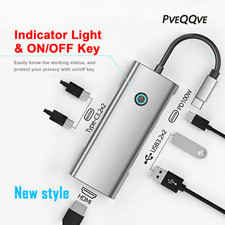
🔌 Eight connections, two ways to plug in
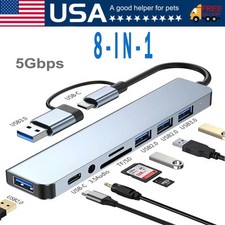
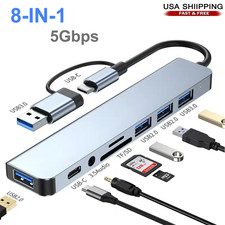
This 8-in-2 USB-C hub turns a single USB-C or USB-A port into a full workspace: extra USB ports, an SD/TF card reader, and audio, in an aluminium body slim enough for a jacket pocket.
🔌 USB-A + USB-C, 8-in-2 design 📸 SD/TF reader, up to 104MB/s 📐 138 × 28 × 10mm body
This 8-in-2 USB-C hub adapter is built for anyone juggling too few ports. Plug it into a laptop, desktop, tablet, or an OTG-enabled smartphone, and it instantly adds extra USB 3.0 and USB 2.0 ports, a built-in SD and TF card reader, and a 3.5mm headphone jack.
Because the cable ships with both a USB-A and a USB-C connector (that's the "2" in 8-in-2), the same hub works across almost any modern device, so you are not left buying a second adapter when you switch machines.
🔧 What you get, and who it's for 🔌 Dual host connector: USB-A and USB-C
One hub, one cable, both a USB-A and a USB-C plug built in, so you're not stuck if your device doesn't have the port you expected.
Best for: anyone who splits time between an older USB-A laptop and a newer USB-C tablet, or shares one hub between two devices at home.
⚡ USB 3.0 for fast transfers
A dedicated USB 3.0 port moves large files, photo libraries, and video projects noticeably faster than a standard USB 2.0 connection.
Best for: backing up phone photos, editing off an external drive, or moving large folders between devices.
🖱️ Two USB 2.0 ports
Two extra ports handle everyday accessories, a mouse, a keyboard, a USB light, or a flash drive, at the same time as your other connections.
Best for: a simple desk setup where you want a mouse and keyboard connected without hunting for a spare port.
📸 Built-in SD and TF card reader
Read a full-size SD card or a Micro SD (TF) card directly, without a separate card reader. The two card types share one slot, so use one card at a time.
Best for: anyone pulling footage off a camera, action cam, or drone, at speeds of up to 104MB/s depending on the card.
🎧 3.5mm audio jack
A dedicated audio port lets you plug in wired headphones or speakers on devices that no longer include a headphone port.
Best for: calls, audio editing, or listening without relying on a wireless connection.
📁 USB-C data port
An additional USB-C port is available purely for data transfer. It does not charge the connected device or power the hub.
Best for: moving files over USB-C, worth knowing upfront if you were hoping to charge through it.
✅ Plug and play, no drivers
The hub is recognised automatically by most laptops, desktops, tablets, and OTG-enabled phones, with nothing to install first.
Best for: anyone who wants to connect it and start working immediately.
🪶 Slim aluminium body
A brushed aluminium-tone housing keeps the hub light enough for daily carry and sturdy enough for regular use in a bag.
Best for: commuters, students, and anyone moving between a desk, a classroom, and a coffee shop.
📐 Specs and dimensions ConnectionQtyNotes ⚡ USB 3.01High-speed data transfer 🖱️ USB 2.02Keyboard, mouse, general accessories 📁 USB-C1Data only, no charging 📸 SD / TF card slot1 (shared)One card at a time, up to 104MB/s* 🎧 3.5mm audio jack1Wired headphones or speakers 🔌 Host connectorUSB-A + USB-CWorks with either, no separate adapter needed
Body approx. 138 × 28 × 10mm, host cable approx. 135mm. *Actual card speed depends on the memory card and host device.
🧩 Built for your setup 💻 Laptops and desktops
Free up your only USB-C port for extra USB-A accessories, a card reader, and audio, all through one cable.
🎨 Tablets and creative setups
Prop your tablet up as a second screen or drawing surface while still reading memory cards and using a keyboard and mouse.
📱 Smartphones with OTG
Browse a USB drive's photos and videos from your phone, or read a camera's SD card without a computer nearby.
⚠️ Please check before you order
- 💳The SD and Micro SD (TF) slots share one reader. Insert only one card at a time.
- 📱Connecting to a mobile phone relies on OTG (On-The-Go) support. Some entry-level or budget phones don't support OTG, please confirm yours does before ordering.
- 🔋The USB-C port is for data transfer only. It does not charge your phone, tablet, or laptop.
📦 What's in the box 1 × USB hub docking station (8-in-2 design), with attached USB-A / USB-C host cable 💬 Why buyers choose this hub
Most people don't need a bulky docking station, they need three or four extra ports, a card reader, and a headphone jack, through the one port their device already has. That's what this 8-in-2 hub is built to do: a single, pocketable adapter that replaces several separate dongles, works across laptops, tablets, and OTG phones, and asks nothing of you beyond plugging it in.
🤝 Our commitment to you
We aim to get every order to you within the estimated delivery window, without unnecessary delays. If you have a question before or after your purchase, our team is on hand to help.