Introduction
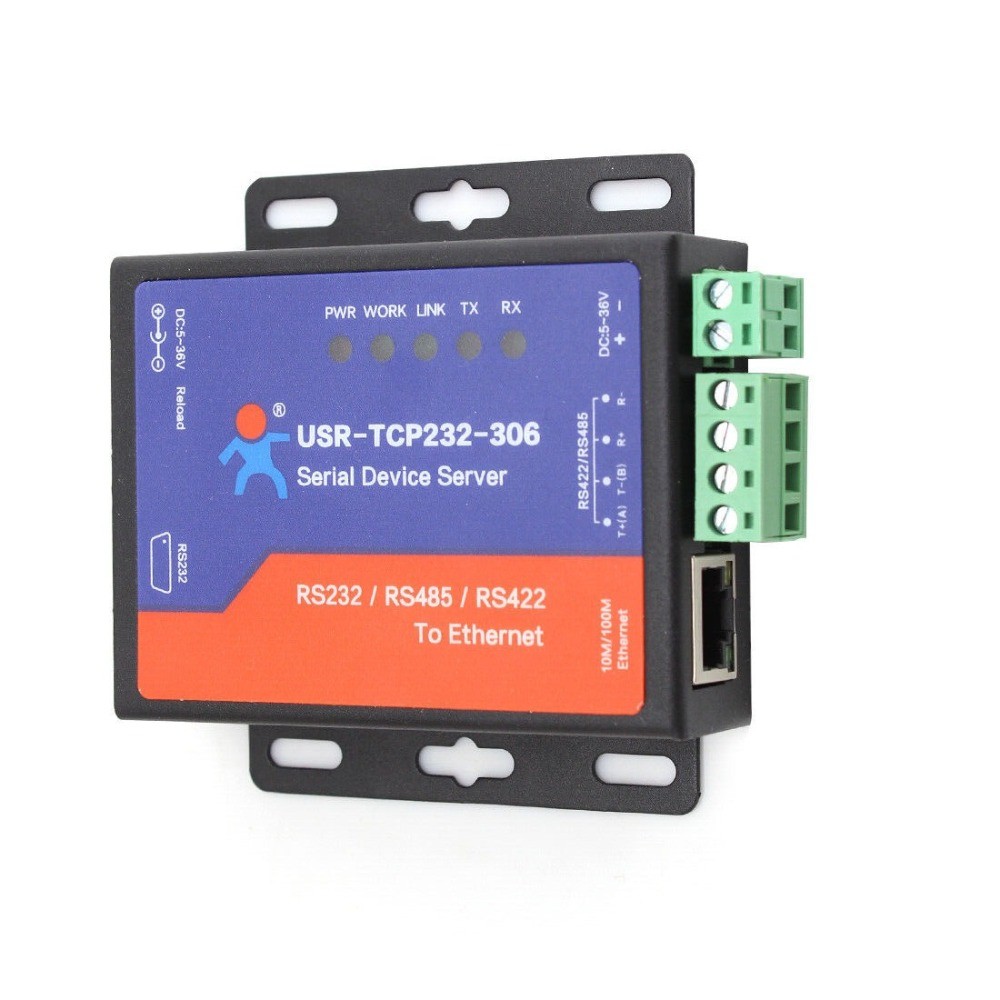
USR-TCP232-306 is a multi serial port server whose function is to realize bi-directional transparent transmission between RS232/RS485/RS422 and Ethernet. User can directly process data interaction through network and device to realize remote data acquisitionremote control and port with 10/100Mbps
Work mode: TCP ServerTCP ClientUDP ClientUDP ServerHTTPD Client
Baud rate of serial port can be configured from 600 bps to 230.4 Kbpssupports check bit of noneoddevenmark and space
Heartbeat package mechanism to ensure connection is reliable, put an end to dead link
User-defined registration package mechanismcheck connection status and use as custom packet header
Supports RS232/RS485/RS422 port ( Can't be used at one time)
Under TCP Server Modethe connection number with client can be randomly set from 1 to 16default number is 4. IP has been connected can be shown according to connectiong with calculating send / recceive dat.
When connection number reaches a maximunthe new connection is kicked off the old one can be configured by user
Parameters can be configured by built-in webpageAT commandserial port procotol and network procotol. Setting procotol is avaliable to integrate into user's software.
Supports TCP client short connection functionuser-defined the disconnected time.
Device restart if no data transmission or timeout. User-defined the restart time.
If data buffer needs to clear configuration before TCP connection establishment
Supports DHCPautomatically obtain an IP address and query IP address via serial setting protocol.
The global unique MAC addressuser-defined MAC address
DNS function
DNS server addres can be defined
Firmware can be upgraded by network
Provide Virtual com software
Restore factory setting through software or hardware
Running across the gateway, switches or routers.
Can work in LANalso can work in the Internet
Application Field
Industrial data transmissionindustrial automation
security and protection monitoringpublic security
Smart home, power controlenvironmental monitoringintelligent agriculture
Door check on work attendance systemPOS systemrice selling system
Building automation systempower monitoring, self-service banking systemtelecom machine room Transparent transmission
Transparent transmission means that whatever is transferredour device plays the role of a channel and sends data to the target without modification. On-site monitoring equipment sends data to Serial Device Servers transparent data transmission terminal by itself portthe terminal CUP receives data by serial port and package data.Various parameter setting method
Software Settings
Download settings softwaresearch related Serial Device Servers in the LAN through the serial port server IPnameMAC addressor the version number. Then set the parameters you needotherwise keep the default.
Web-page SettingsOpen your browser and inter the default IP address of the Serial Device Servers.
Open the login page of Serial ServerEnter the user name and password (default admin).
After setting parameterClick Save and Restartthen setting will take effect.
Serial AT commands Settings
User can set parameter by module itself without going through another computer to configure. This setting method is used in the following situation: user have to configure IP address and destination IP address on site. AT command can meet the demand. After MCU connects serial server module by TTL (UART)MCU can configure setting by AT command.Hardware
Work Volt DC 5.0~36.0 V
Work Current 116mA@5V/53mA@12V
Ethernet Port 10/100Mbps auto switch between cross and direct connection
Baud rate 600-230.4K bps
Serial Port RS232*1 / RS485*1 / RS422*1
Can't be used at one time
Software
Network Protocol IPTCP/UDPARPICMPIPV4
IP Mode Static IPDHCP
DNS User-defined DNS server address
Configure Software/Webpage/AT command
Work Mode TCP Server/TCP Client/UDP Server/UDP Client