WiFi 6E AX5400 Tri-Band Intel AX210 Network Card Bluetooth 5.3 Ultra-Low Latency✦ WiFi 6E · AX5400 · INTEL AX210NGW ✦WAVLINKWiFi 6E AX5400 M.2 Wireless Module · WN675X3MUnlock the 6GHz Band.
M.2 Compact. Intel Powered.
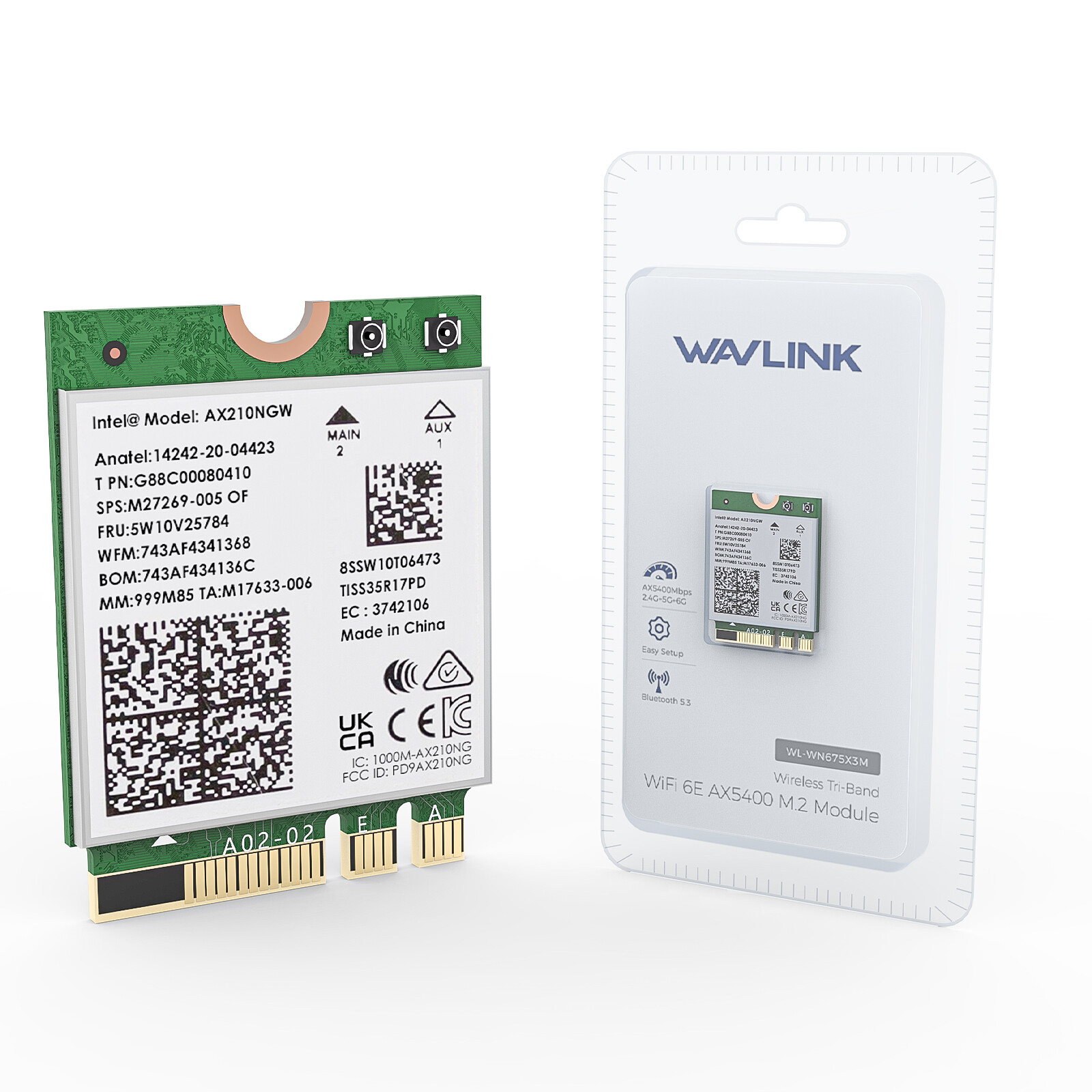
Powered by the Intel AX210NGW chipset, the WN675X3M brings tri-band WiFi 6E to your laptop's M.2 slot — 574Mbps on 2.4GHz, 2400Mbps on 5GHz, and 2400Mbps on the dedicated 6GHz band. With Bluetooth 5.3, WPA3, OFDMA, and MU-MIMO — all in a 22×30mm module.
5374Mbps Total6GHzTri-BandBT 5.3Bluetooth22×30mm M.2Product OverviewPowerful Wi-Fi 6E Technology. Expand to the clearer, broader 6GHz band for more bandwidth and faster speeds. Heartily enjoy 8K movies, large file transfers, and massive multiplayer online games with fewer dropped connections on the 5GHz/6GHz band. The 2.4GHz band handles basic internet needs including online chat and email. 2.4 GHz574MbpsBasic InternetLong-range coverage for chat, email & IoT devices5 GHz2400MbpsGaming & StreamingFewer dropped connections — 8K movies & massive online games6 GHz · NEW2400MbpsDedicated SpectrumExclusive to WiFi 6E — massive congestion reductionM.2 Form FactorCompact 22 × 30mm Module.AX210NGWM.2 / NGFF Key-A or Key-E
This laptop WiFi card is available for laptops with an M.2 slot (Key A or Key E). The ultra-compact 22mm × 30mm form factor fits cleanly into the internal M.2 connector of most modern laptops. Not for Key M and Key B — those slots are used for SSDs. Please verify there is an M.2 Key A or Key E connector in your laptop before purchasing.
22 × 30 mmM.2 / NGFFKey-A or Key-EIntel AX210NGWCore CapabilitiesEngineered for the Next Decade of Wireless.🚀Powerful Wi-Fi 6E Technology
Expand to the clearer, broader 6GHz band for more bandwidth and faster speeds. Heartily enjoy 8K movies, large file transfer and massive multiplayer online games with fewer dropped connections on 5GHz/6GHz band. 2.4GHz band for basic internet needs including online chat and email.
⚡Tri-Band Super High Speed
In contrast to the overcrowded 2.4GHz and 5GHz bands, the spacious 6GHz spectrum is exclusively dedicated to efficient WiFi 6E connections, resulting in a significant reduction in network congestion. Experience up to 2400Mbps (6GHz), 2400Mbps (5GHz), and 574Mbps (2.4GHz).
🔵Newest Bluetooth 5.3 Function
Bluetooth 5.3 provides 4× range over Bluetooth 4.2, doubles the transmit speed for faster transmissions thereby reducing the overall power. Ideal for Bluetooth TWS earbuds, headset, keyboard, mouse and others. Backwards compatible with BT5.1, 5.0, 4.2, 4.0, 3.0, 2.1.
🎮Minimized Lag for Your PC
This Wi-Fi 6E card brings your laptop's WiFi reception to the next level with the combination of OFDMA and MU-MIMO. Enhance the efficiency of your laptop's WiFi connection by enabling multiple devices to communicate simultaneously with your router, eliminating the need for data queuing and waiting.
🔐WPA3 Security
With the introduction of WPA3, cyber security is boosted with new capabilities. Ensuring that your home network is fortified with superior level of security. Support WPA/WPA2/WPA3, WPA-PSK/WPA2-PSK encryption.
🖥️Compact M.2 Form Factor
Just 22mm × 30mm (0.9in × 1.2in) — a slim M.2/NGFF module that disappears inside your laptop. No external antennas, no dongles, no exposed hardware. Clean, integrated, permanent.
WiFi 6E (802.11ax)Tri-Band 6GHzMU-MIMOOFDMABSS Coloring1024QAMTarget Wake Time (TWT)Bluetooth 5.3WPA3Intel AX210NGWQuick SetupFour Steps to 6GHz.
Simple installation — power off, open the case, slot in the module, and install the driver. Recommended to download the driver first and then install the network card for the smoothest experience.
1Verify Slot Type
Confirm your laptop has an M.2 slot (Key A or Key E). Not for Key M/B — those are for SSDs.
2Download the Driver
Download the driver from the Intel / WAVLINK website first — recommended before installing the card.
3Install the Module
Power off, open the case, and slot the module into the M.2 Key-A or Key-E connector. Secure with the included screw.
4Install & Enjoy
Install the driver, restart, and connect to your WiFi 6E network. Windows 11 required for the 6GHz band.
Important: Requires a WiFi 6E router and the PC must be on Windows 11 to enable the 6GHz band. Recommended to use a WiFi 6 or WiFi 6E compatible router for faster wireless speed and better network performance.
Tech DataSpecificationProduct ModelWN675X3MChipsetIntel AX210NGWTransmission Rate2.4GHz: 574Mbps · 5GHz: 2400Mbps · 6GHz: 2400MbpsProtocol StandardSupport IEEE 802.11a/b/g/n/ac/axFrequency Band2.4GHz · 5GHz · 6GHzTechnical SupportMU-MIMO · OFDMA · BSS Coloring · 1024QAM · Target Wake Time (TWT)Bus InterfaceM.2 / NGFF Key-A or Key-EPackage Size22mm × 30mm (0.9in × 1.2in)Support SystemWin 11/10 (64-bit) · Linux 5.10+Bluetooth VersionBluetooth 5.3Wireless SecurityWPA / WPA2 / WPA3, WPA-PSK / WPA2-PSK EncryptionOS SupportCompatible Systems
Supports Windows 10/11 (64-bit) and Linux 5.10+ — with one important caveat: to utilize the 6GHz band, the user must be on Windows 11.
Windows 10 (64-bit)Windows 11 (64-bit)Linux 5.10+✘ Windows 32-bit✘ macOS
6GHz Note: To utilize the 6GHz band, the PC must be running Windows 11. Windows 10 supports the adapter but is limited to 2.4GHz and 5GHz bands. Requires a WiFi 6E router to access the 6GHz spectrum.
Before You BuyKnowing the Following Will Give You a Better Product ExperienceImportant notes before installation
- 1This laptop WiFi card is available for laptops with an M.2 slot (Key A or Key E).
- 2Download the driver from the Intel / WAVLINK website. It is recommended to download the driver first and then install the network card.
- 3Requires a WiFi 6E router and the PC must be on Windows 11 version to enable the 6GHz band.
- 4Recommended to use a WiFi 6 or WiFi 6E compatible router for faster wireless speed and better network performance.
- 5This Wi-Fi card will not boost the speed of the original router — it only helps your computer receive a better signal and speed of the router (increases the maximum wireless bandwidth limit).
- 6It has nothing to do with the quality of this adapter when you can't get the maximum speed. Network environment, router, barriers, laptop and PC's internal memory… the interference of many factors may affect the speed.
What You GetPackage Contents📡WiFi 6E AX5400 M.2 ModuleWN675X3M main unit · 22×30mm🔧Screwdriver + ScrewFor M.2 module installation📖User ManualSetup and driver installation guideWAVLINKWiFi 6E · AX5400 · Intel AX210NGW · M.2 Key-A/E · Bluetooth 5.3Tri-Band WiFi 6E. In Your Laptop's M.2 Slot.
574 + 2400 + 2400 Mbps across 2.4GHz, 5GHz, and 6GHz — with OFDMA, MU-MIMO, 1024QAM, WPA3, and Bluetooth 5.3 in a 22×30mm module.
WiFi 6E Tri-Band574Mbps + 2400Mbps + 2400Mbps across 2.4GHz, 5GHz, and 6GHz.Intel AX210NGW ChipsetIndustry-leading silicon with OFDMA, MU-MIMO, 1024QAM, and TWT.Bluetooth 5.34× range over BT 4.2 with doubled transmit speed and lower power.WPA3 + Compact M.2Latest security standard in a 22×30mm M.2 Key-A/E module. Model: WN675X3M · Chipset: Intel AX210NGW · M.2/NGFF Key-A or Key-E.
Support Windows 10/11 (64-bit) and Linux 5.10+. To utilize the 6GHz band, the PC must be on Windows 11.
Requires a WiFi 6E router to access the 6GHz spectrum. Driver installation required — download from Intel/WAVLINK website first.
Not for Key M and Key B slots (used for SSDs). Please verify there is an M.2 Key-A or Key-E connector in your laptop before purchasing.
This Wi-Fi card will not boost the speed of the original router — it only helps your computer receive a better signal from the router.