UBB Store

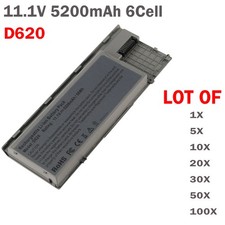
🧡LOT Battery For Dell Latitude D620 D630 D631 M2300 TYPE TG226 UD088 5200mAh
When you click on links to various merchants on this site and make a purchase, this can result in this site earning a commission. Affiliate programs and affiliations include, but are not limited to, the eBay Partner Network.
🧡LOT Battery For Dell Latitude D620 D630 D631 M2300 TYPE TG226 UD088 5200mAh
Price: US $15.99
  • Battery type: Li-ion
    Voltage: 11.1V (Compatible with 10.8V)
    Capacity: 5200mAh/58Wh
    Cell: 6 Cells
    recharge cycles 500
    Operation time: Around 2-3 hours

    Compatible Models

    For Dell
    TG226,UD088,UG260,312-0654,KP42

    Compatible Part Numbers

    Latitude M2300 series

    Compatible Part Numbers:
    0GD775 0GD787 0JD605 0JD606 0JD610 0JD616 0JD634 0JD648
    0KD489 0KD491 0KD494 0KD495 0PD685 0RD300 0RD301
    0TC030 0TD116 0TD117 0TD175 0TG226 0UD088 0UG260
    GD775 GD776 GD787 JD605 JD606 JD610 JD616 JD648 JD775
    KD489 KD491 KD492 KD494 KD495 PD685 RC126 RD300 RD301
    TC030 TD116 TD117 TD175 TG226 UD088
    KP423 0NT367 PC765 JD634 NT379 PC764
    312-0384 312-0386 310-9080 312-0653 310-9081 312-0654 312-0383 451-10298

    How to confirm that the battery is suitable for your laptop?
    Method 1: Use System Information to find your laptop model
    Step 1: Press Windows + R to open Run window.
    Step 2: Input "msinfo32" in the empty box and click OK to open System Information.
    Step 3: Keep in the System Summary section, and you will find the System Model item in the right pane.
    Method 2: Remove Battery from Laptop to find your laptop battery part number
    Step 1: Switch off the laptop and unplug the power cable in case of electric shock
    Step 2: Remove the back panel with the screwdriver. You should to this with care avoiding any harm to the laptop components.
    Step 3: Disconnect the cable connected to the battery and then take out the battery. After that, you can check the specifications of your battery.
    Install A New Battery:
    1. You need to turn off your laptop and disconnect the power.
    2. Disconnect the connection between the old battery and the motherboard to avoid unnecessary damage caused by disassembling the battery. Then unscrew the old battery screws one by one and carefully save each screw.
    3. Remove the old battery, carefully install the new battery on the battery case, screw in the screw, and connect the wiring of the new battery.
    4. If you don't understand the above steps, you can search for the video about laptop battery installation on YouTube. Maybe it will help you
    Laptop Battery Instructions:
    1. Discharge the new battery to 10% (not 0%), then charge(100%) and cycle 3-5 times to wake up the new battery.
    2. It can calibrate the state of the battery by performing a complete and effective charging and discharging of the battery once a month.
    3. Charge it to around 50% when you store it long term.
    4. Do not keep your battery below 5% or deep discharge state (long time 0%), may turn on battery protection and cause the battery to fail to charge.
    5. Please feel welcomed to notify us of any inconvenience or fault in our battery.
    The following are troubleshooting methods:
    1. Turn off the laptop.
    2. Unplug AC power.
    3. Remove the battery.
    4. Replace AC power.
    5. Turn on laptop,allow OS to boot.
    6. Once logged into the machine, perform a normal shut down.
    7. Unplug AC power.
    8. Replace battery.

    On Apr 29, 2026 at 21:25:19 PDT, seller added the following information:


    Buy Now