Store CategoriesStore Categories12/9cm Cooling Fan Position Speaker Built-in Computer Case 9 Pin USB Interface
Product Description
⭐️ Features:
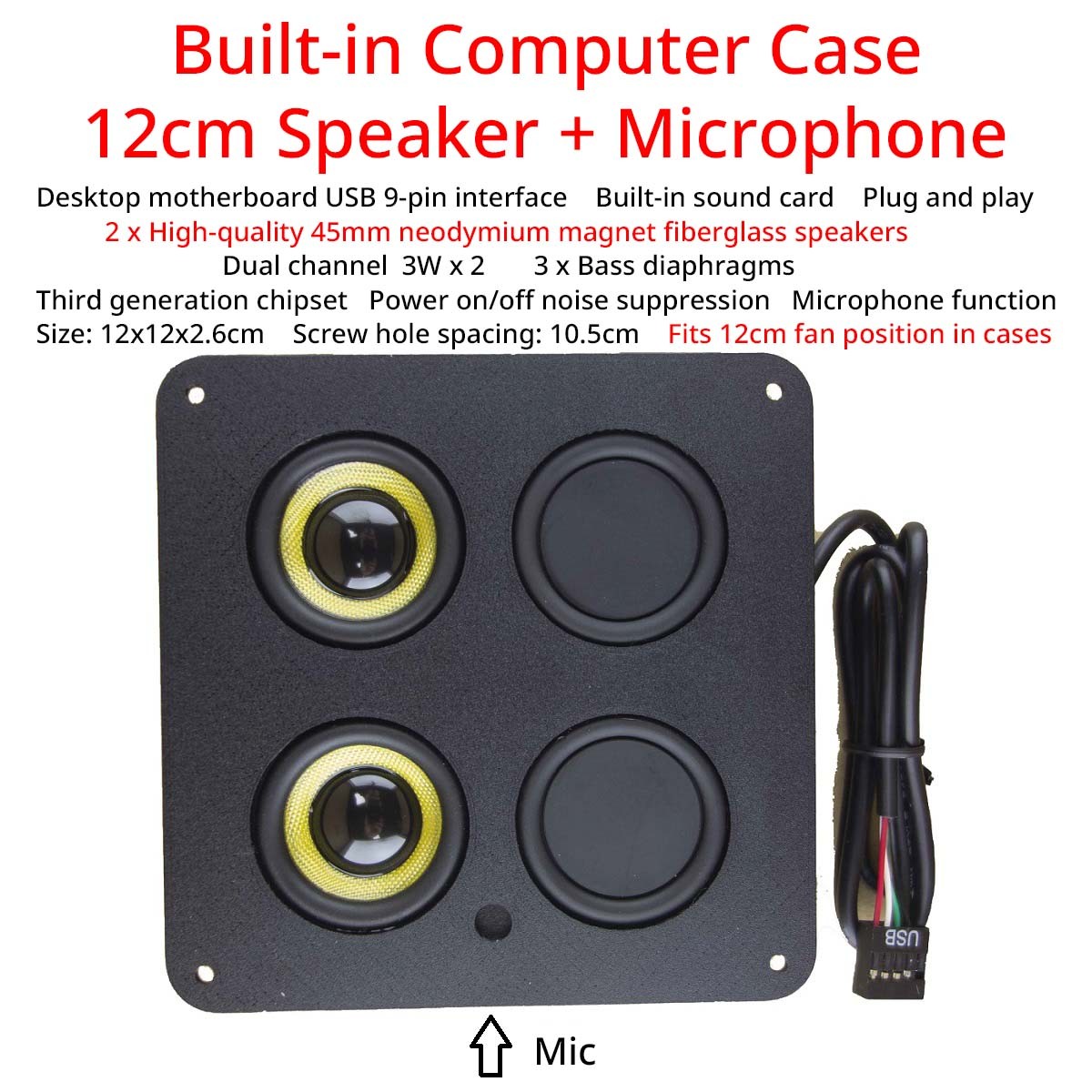
Built-in 12/9cm fan position speaker + microphone (optional) inside the computer case.
Desktop motherboard USB 9-pin interface.
Built-in sound card, one cable, plug-and-play.
2 x High-quality 45mm neodymium magnet fiberglass speakers (12cm version),
2 x 40mm speakers (9cm version), Dual-channel, Speaker power: 3W x 2.
2 x Bass diaphragm on the front, 1 x Bass diaphragm on the back (12cm version).
Third generation chip solution, Power on/off noise suppression. Microphone function.
12cm version Size: 12x12x2.6cm, Screw hole spacing: 10.5cm.
9cm version Size: 9x9x2.4cm, Screw hole spacing: 8.2cm.
Fits 12/9cm cooling fan position in computer cases.
Magnet on the back, can be attached to the steel cases (9cm version).
Data cable length: 60cm/23.6in.
Includes installation screws.⚙️ Installation:
1. Just plug the USB socket into the 9-pin header with the F-USB logo on the motherboard of the host computer.
2. Restart the computer.
3. Suitable forcomputers with F-USB.📌 Installation Notes and Reasons for Continuous Clicking Sounds:
1. Insert while the computer is turned off.
2. If inserting while the computer is turned on, ensure it is inserted correctly in one go. If inserted incorrectly, remove the speaker, reset the BIOS, and reinsert it. Otherwise, the computer will continue to make clicking sounds after restarting and may damage the speaker.
Cause Analysis: If the cable is inserted incorrectly the first time, causing the interface to misalign, the computer will recognize it after reinserting it correctly. However, after restarting, the BIOS will classify this USB device as faulty and fail to provide normal power supply recognition, resulting in the continuous clicking noise. So we suggest that you insert it while turning off the device.📦 Package Includes:
1x USB Computer Speaker, Screws
- Payment Policy
- Shipping Policy
- Returns Policy
- About us
Payment Policy1. The only payment method we accept so far is Management Payment.
2. If this brought up any inconvenience to you, please accept our apology. Any other question is welcome to ask through our excellent customer service.
Shipping Policy1. We only ship to your verified addresses. Your address MUST MATCH your Shipping address.
2. The default way is international economy shipping. To other country could take around 20-45 days on the way. And bad weather or peak season could make it longer. Please be patient.
3. If you need urgent, please choice express shipping option or send message to us after placing order.Returns Policy1. Please leave positive 👍response and 5-star ⭐️⭐️⭐️⭐️⭐️rating, it helps us do better for you.
2. Please contact us if you have any questions before or after purchase.
3. If you receive the items have quality problems or damaged, please provided the photos and contact us, we will resend it or refund your payment. But we will not accept return by buyer operational errors caused damaged items.About us1. Business Hour: Monday To Friday: 9:00 AM to 6:00 PM (Beijing China time).
2. Due to time zones, our reply to your questions may not be immediately. But within above working time, we will reply your email within 24 hours. If it's non-workdays, please kindly be patient and wait till Monday.
3. Please contact us with message.Copyright © 2023 Dianxiaomi