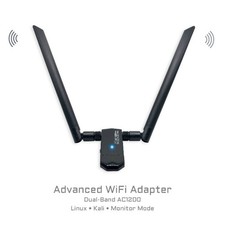
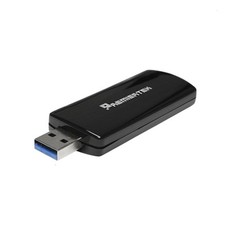
Built for Linux users who need more than a basic WiFi dongle. The WIF02 uses the Realtek RTL8812AU chipset and adds AC1200 dual-band wireless connectivity through 2.4 GHz and 5 GHz networks. It is especially well suited for Kali Linux, monitor mode, packet injection, wireless diagnostics, lab systems, Linux desktops, gaming distributions, and live-USB environments.
WIF02 was plug-and-play tested on a wide range of Linux distributions, including Ubuntu, Fedora Workstation, Elementary OS, openSUSE, Garuda Linux, Bazzite, Solus Budgie, Batocera, CachyOS, and Arch Linux. Kali Linux requires driver installation; Tech Store On provides both an online setup guide and a downloadable driver package for offline installation.
Important compatibility note: WIF02 is a Linux-focused adapter. It is not compatible with macOS or Windows 11. Linux support varies by distribution, kernel, and system configuration, so review the tested compatibility section below before ordering.
Realtek RTL8812AU AC1200 Dual-Band 2.4 GHz + 5 GHz USB 3.0 2×2 MIMO Kali Monitor Mode Packet Injection Linux-FocusedWhat It’s Great For
- Kali Linux: driver installation, monitor mode, packet injection, packet capture, and authorized wireless testing.
- Linux desktops and laptops: dual-band WiFi on many tested distributions.
- Gaming and specialty Linux systems: tested plug-and-play with Bazzite, Batocera, Garuda, CachyOS, and Arch Linux.
- Repair and lab environments: tested plug-and-play with WinPE 10 and Windows 10.
- Offline Kali setup: download the driver package on another computer, transfer it by USB, and install it locally.
✅ Tested Plug-and-Play CompatibilityPlug-and-play means the adapter created a usable wireless interface without manually installing a driver.Operating system / distributionTest resultUbuntu DesktopPlug-and-play tested on a bunch of various laptops, PCs and miniPCsFedora WorkstationPlug-and-playElementary LinuxPlug-and-playWindows 10Plug-and-playWinPE 10Plug-and-play
Results are based on Tech Store On testing. Linux behavior can vary by kernel version, distribution build, Secure Boot settings, USB controller, and system configuration.
🐉 Kali Linux Driver + Monitor Mode Setup
Kali Linux detects the RTL8812AU adapter at the USB level, but a driver must be installed before a usable wireless interface appears. The Kali repository package can be installed online, or the driver package can be downloaded in advance for offline setup.
Open the Tech Store On Kali RTL8812AU driver, monitor mode, and injection setup guide
Online installationsudo apt updateapt search 88xxausudo apt install realtek-rtl88xxau-dkmssudo modprobe 88XXau
If the adapter does not initialize or appear as a wireless interface after loading the module, reboot Kali Linux and check again.
sudo rebootOffline driver download
Download the package on another computer, transfer it to the Kali system using a USB drive, extract the ZIP file, and install the included package locally.
Download the Tech Store On RTL8812AU Kali Linux driver package
Included the folder containing the extracted package:
sudo apt install class="wifi-tip">Offline installation may still require DKMS, matching kernel headers, compiler tools, and dependencies already present on the Kali system. The full guide includes verification, monitor-mode setup, and an authorized injection test.⚠️ Systems Not Supported or Not Plug-and-Play in TestingDo not purchase WIF02 for macOS or Windows 11.Operating system / distributionTest resultWindows 11Not supported in testing; included legacy driver did not produce a working adaptermacOSNot supportedLinux MintNot plug-and-play; available repository driver did not create a usable interfaceBoot-Repair-DiskNot plug-and-play; Mint-based environmentZorin OSAdapter detected, but no usable interface in testingPop!_OSAdapter detected, but no usable interface in testingBodhi Linux LegacyNot plug-and-play in testingBodhi Linux MinimalNot plug-and-play in testingSystemRescueDetected by USB, but no usable wireless interface without additional driver workCAINENot plug-and-play in testingCAELinuxNot plug-and-play in testingUbuntu Server Live 24.04Not exposed as a usable network interface in testing
A failed plug-and-play test does not necessarily mean the chipset can never work on that distribution. It means Tech Store On does not currently provide or support a verified installation path for that system.
📦 Package Contents + Technical Specifications
- WIF02 USB WiFi adapter with Realtek RTL8812AU chipset
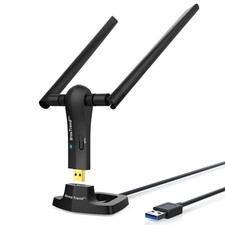
- Two adjustable external antennas
- USB 3.0 extension cradle / cable
- Retail box
Chipset: Realtek RTL8812AUWiFi standard: 802.11acMaximum rated speed: up to 867 Mbps on 5 GHzMaximum rated speed: up to 300 Mbps on 2.4 GHzInterface: USB 3.0 / USB 3.1 Gen 1MIMO: 2×2Connector: USB-AAntennas: dual adjustable external antennasAdvanced modes: monitor mode and packet injection with compatible Kali driver setupPrimary use: Linux, Kali, wireless diagnostics, and authorized cybersecurity labs⚙️ Quick Start
- Supported plug-and-play Linux distributions: connect WIF02 to a USB 3.0 port, open network settings, select the new wireless interface, and connect to WiFi.
- Kali Linux: install realtek-rtl88xxau-dkms, reboot, and verify that a new wireless interface appears.
- Windows 10 / WinPE 10: connect the adapter and allow the operating system to load its driver automatically.
The external adapter may appear as wlan1, wlan2, or an interface beginning with wlx.
🚀 Performance Tips
- Use a USB 3.0 port for the best available throughput.
- Use the included extension cradle to improve antenna placement and reduce interference near the computer.
- Use 5 GHz for higher speed at shorter range and 2.4 GHz for longer range through walls.
- After a kernel update, a manually installed DKMS driver may need to rebuild before the adapter works again.
🔧 Troubleshooting
- Detected but no WiFi interface: seeing RTL8812AU in lsusb only confirms USB detection; it does not confirm that a working driver loaded.
- Kali interface missing: install the Kali RTL88xxAU DKMS package, reboot, and verify with iw dev or ip link.
- Linux compatibility issue: compare your distribution with the tested compatibility tables above.
- Connection instability: try a different USB 3.0 port, avoid unpowered hubs, and reposition the adapter using the extension cradle.
Responsible use: Monitor mode and packet injection are intended only for networks and systems you own or are explicitly authorized to test. Availability depends on the operating system, kernel, driver, and configuration.