About the item:
When picking your shipping, Clicksee detailnext to shipping in the ad to see all your available shipping options.
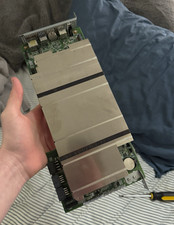
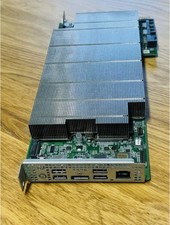
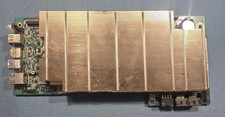
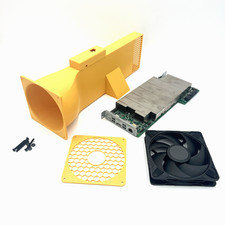
The Beautiful BC-250 Cooling Solution with a FULL Enclosureallows the installation of a BC-250 BIOS modded card (optional purchase).
You will need you own power supply unit. You choose if you want a brand new BIOS Modded Asrock BC-250 included or not. The enclosure comes with a fan duct and sleeve that comes in stunning white. It gives an elegance look to any room.It is made from high grade ABS. The thermal resistant enclosure ensures adequate resistance to temperatures up to 105°C.
Performance;It was important to us that the end user would be able to use a 140mm fan at 2800 rpm as any faster like the server type fan would be disruptive to listen to while coding, gaming or used for mining. The enclosure was designed for the air to take the path of least resistance while keeping the card safe. Laboratory torture tests were used pulling 200 watts, with an ambient environment air temperature of 21°C. Engineering results were 70°Con the CPU/GPU.Our team worked tirelessly to bring the best performing enclosure at the best possible value. The fan speed can be adjusted in the BIOS to your desired speed.
Material:The enclosure is made from heat resistant ABS.
What comes in the box of your BC-250 Cooling Solution Enclosure:
-1 GPU sleeve-1 Fan Duct-1 Enclosure stand-1 Fan Guard-1 8 pin power cap-1 140mm fan installedBios modded BC250 sold as a purchase option
When picking your shipping, click see detail to see all your available shipping options.European BUYERS
If you choose to purchase a BC-250 with this kit, will be shipped without the bios battery (CR2032) due to Canada Post battery shipping restrictions. Canada Post is cheaper but with restrictions like batteries in this case. If you use International Shipping Program then allows batteries in devices to be shipped. If you use Canada post then you won't have the battery and you'll have to pop one in if you want the bios to remember the unlock. This battery is inexpensive. After that you'll have to go into the bios to re-enable the GFX unlock.
To Configure the BIOS:
- Spam Del key during boot to enter BIOS setup.
- Navigate to Chipset > GFX Configuration:
- Set Integrated Graphics Controller to "Forced".
- Set UMA Mode to "UMA_SPECIFIED".
- Set UMA Frame Buffer Size to 512MB for balanced CPU/GPU VRAM split from the 16GB GDDR6
- Navigate to Advanced > CPU Configuration:
- Press F10 to save and exit.
USA BUYERS
The U.S. has stoped collecting tariffs on Tuesday, Febuary 24, 2026 after they were deemed illegal by the Supreme Court.