Belkin B2B115 Apple MFi Certified Wired Keyboard to iPads & Lightning Connector
At a Glance:
Designed for classroom use
Wired connection directly to iPad
SBAC and PARCC testing compliant
Full-size keys for easy navigation
No batteries or charging required
KEY FEATURES:
1. Apple MFI Certified
2. Lightning connector provides wired connection to iPad, no batteries or charging required
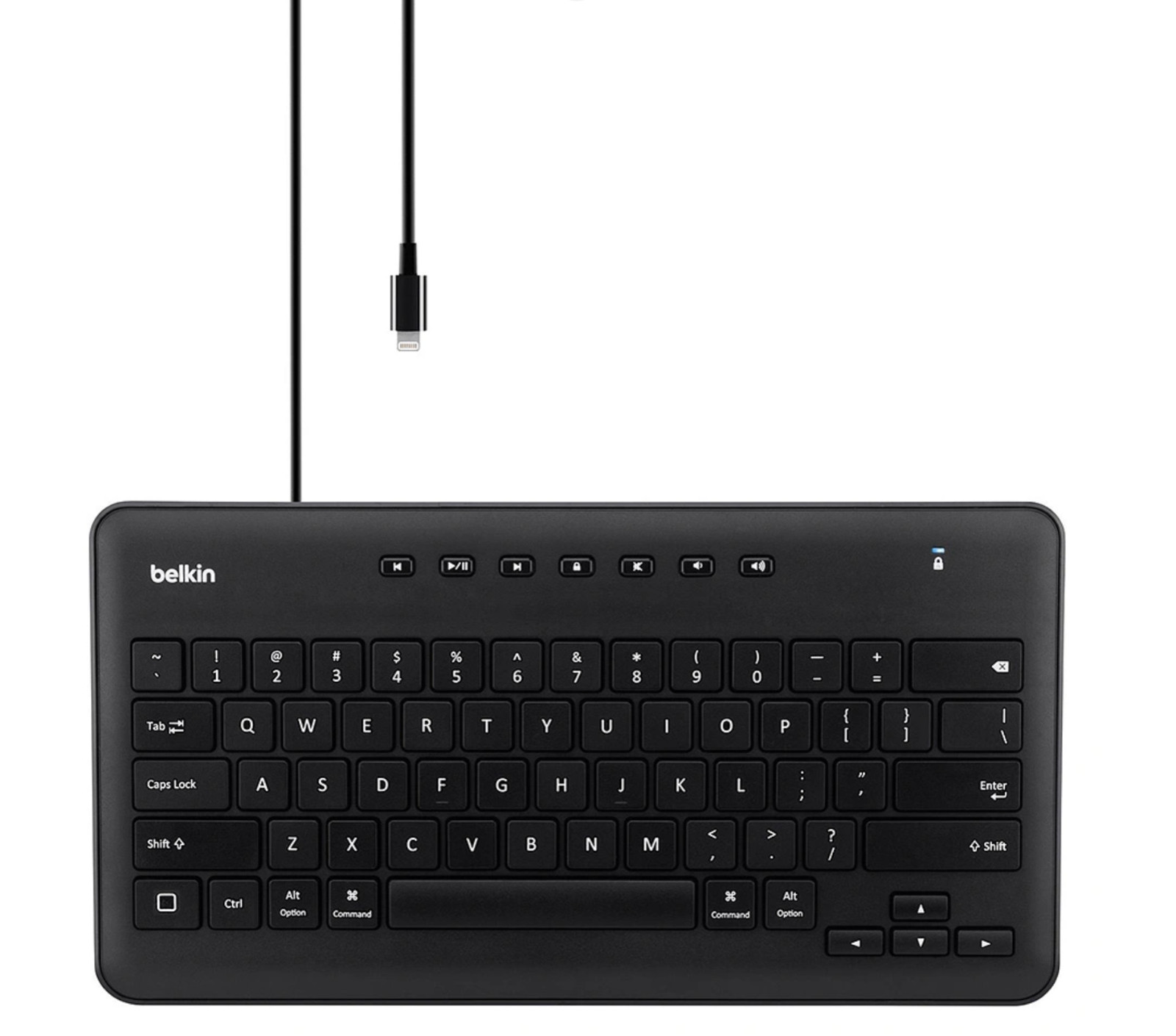
3. Multimedia and arrow keys for easy navigation
4. Well-spaced keys for comfortable typing
5. “Correct connect” diagnostic indicator
6. Durable, lightweight design
WIRED DESIGN IDEAL FOR STANDARDIZED TESTING
Wireless keyboards are not always permitted during standardized testing, and battery-powered or rechargeable keyboards can run out of power at inopportune times. The Wired Keyboard connects to an individual iPad via a secure wired connection and requires no batteries or charging. This makes the keyboard ideal for SBAC and PARCC testing as well as school deployments at any grade level.
WELL-SPACED KEYS FOR COMFORTABLE TYPING
Designed with students in mind, this durable, lightweight keyboard features full-sized, well-spaced keys for comfortable typing. Multimedia controls offer convenient one-touch access to a variety of features, including volume, mute, play/pause, fast-forward, rewind, and screen lock. Full-size arrow keys allow students to navigate easily through documents and websites.
Package Includes:
Belkin Secured Wired Keyboards for iPad® Frequently Asked Questions
1. What are the Belkin Secure Wired Keyboards for iPad®?
The Belkin Secure Wired Keyboards for iPad are wired, plug-and-play keyboard ideal for school use. They come with full size and well-spaced keys that provide comfort while typing
2. What are the different Belkin Secure Wired Keyboards for iPad®?
The Belkin Secure Wired Keyboards for iPad are B2B114, B2B125, B2B115, and B2B124. The B2B114 and B2B125 have the 30-pin connector while the B2B115 and B2B124 have the lightning connector. To know more about it, click here.
3. What iPad versions are compatible with the Belkin Secure Wired Keyboards for iPad, B2B114 and B2B115?
B2B114 and B2B125
iPad (Original)
iPad 2
iPad 3rd gen
B2B115 and B2B124
iPad Air
iPad 4th gen
iPad mini
4. How do I set up the Belkin Secure Wired Keyboards for iPad?
The Belkin Secure Wired Keyboards for iPad are plug-and-play keyboards and do NOT need any software to set up. For instructions on how to set up, click here.
5. Do I need to charge the Belkin Secure Wired Keyboards for iPad?
No. You do NOT need to charge the Belkin Secure Wired Keyboards for iPad. Your tablet will be the power source of the keyboard.
6. How do I power ON the Belkin Secure Wired Keyboards for iPad?
There is no need to power ON the Belkin Secure Wired Keyboards for iPad. Once you connect the keyboard to your tablet, you can immediately use it.
7. Are there any short-cut keys of the Belkin Secure Wired Keyboards for iPad?
Yes, there are short-cut or one-touch access keys incorporated in the Belkin Secure Wired Keyboards for iPad. The one-touch access keys make the keyboard usage easy and more productive.