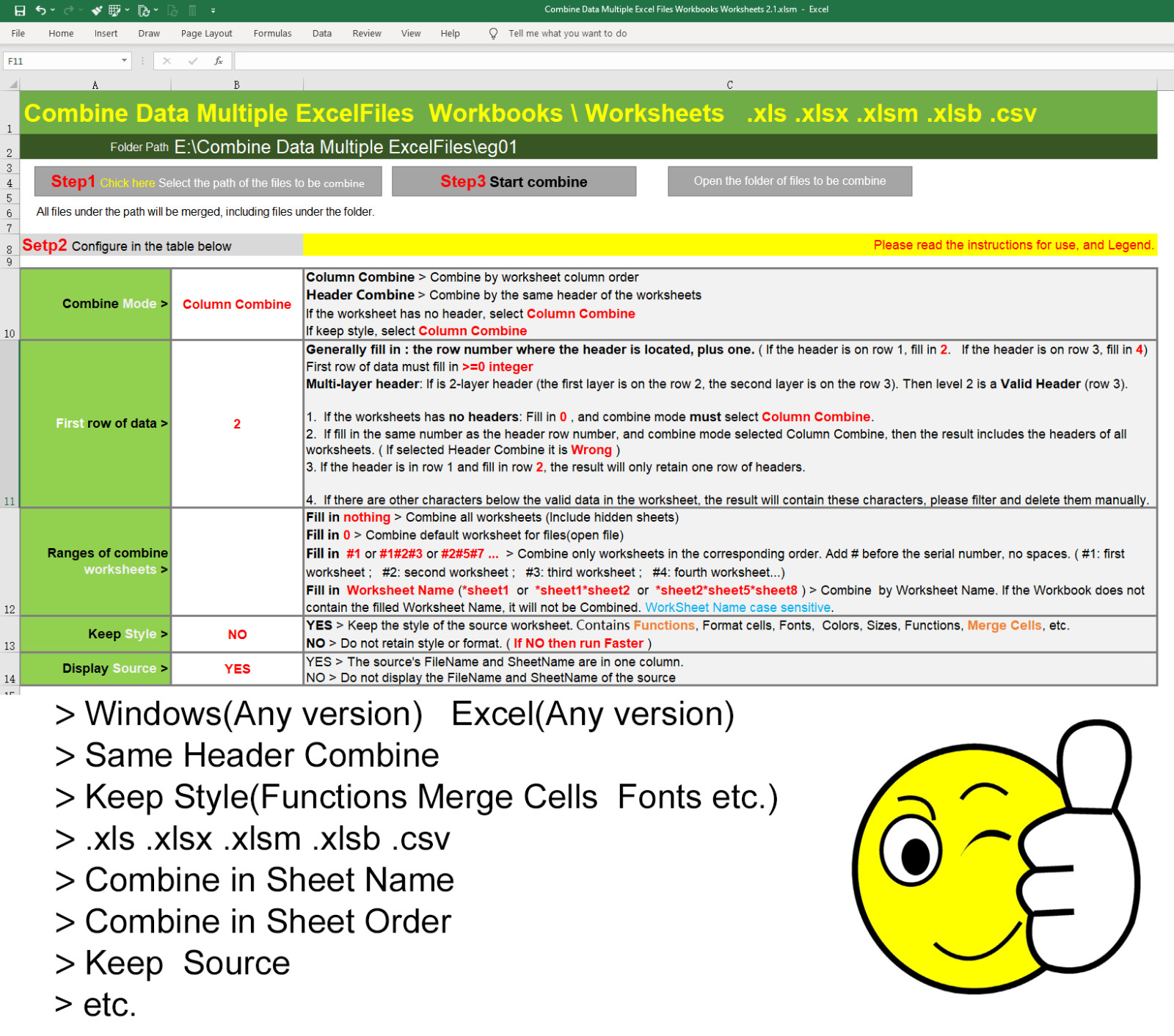
Combine Worksheets To One Worksheet ToolsExcel Template VBA1. Combined file types: .xls .xlsx .csv3. "Column Combine" > Combine by worksheet column order.4. "Header Combine" > Combine by the same header of the worksheets.5. If the worksheet has no header, select "Column Combine".6. If the worksheets has no headers, is OK.7. Combine only worksheets in the corresponding order. Add # before the serial number, no spaces. ( #1: first worksheet ; #2: second worksheet ; #3: third worksheet ; #4: fourth worksheet...)8. Combine by Worksheet Name. If the Workbook does not contain the filled Worksheet Name, it will not be Combined. WorkSheet Name case sensitive.Keep the style of the source worksheet. Contains Functions, Format cells, Fonts, Colors, Sizes, Functions, Merge Cells, etc.9. If a Password is required to open the file, is OK.10. The source's FileName and SheetName are in one column.
11. Only .csv files can be Combined. .xls and .xlsx can be combined together.12. The result file is automatically saved to the directory of the current file.13. Supports any version of Excel, Macros must to be enabled.
SETP 1: Select the path of the files to be combineSETP 2: Configure, So EasySETP 3: Start CombineFINISH