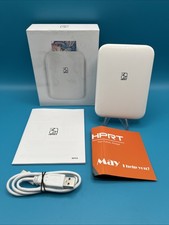
HPRT MT53 Zink Photo Paper, 20 Sheets
2 x 3 inch sticky-backed refill paper for the MT53 pocket photo printer
Please read: this is the PAPER only
You are buying 20 sheets of 2 x 3 inch Zink photo paper. A printer is not included, and neither is a case, a cable or a battery.
The printer you can see in the listing photo is there to show you what the paper is used in. It is not part of this item. Please order this only if you already own a pocket printer that takes standard 2 x 3 inch Zink paper.
Features20 Sheets Per Pack
One refill pack of twenty 2 x 3 inch Zink sheets, enough for twenty full colour prints.
Peel and Stick Backing
Every sheet has an adhesive back you can peel off, so prints go straight onto notebooks, albums, walls and gifts.
No Ink Needed
Zink paper carries the colour inside the sheet itself. There are no cartridges, no ribbons and no ink to buy.
Made for the MT53
Sized for the HPRT MT53, and it also fits other pocket printers that take standard 2 x 3 inch Zink paper.
SpecificationsItemZink photo paper refill packSheets Per Pack20Sheet Size2 x 3 inch (about 50 x 76 mm)BackingPeel off adhesive, sticky backPrint TechnologyZink inkless thermalDesigned ForHPRT MT53 pocket photo printerAlso FitsPocket printers that use standard 2 x 3 inch Zink paperPrinter IncludedNo. This listing is the paper only.Package Contents
20x 2 x 3 inch Zink sticky-backed photo sheets.
No printer, no case, no cable and no other accessories are included.
FAQQ: Does this include the MT53 printer?
A: No. This listing is 20 sheets of paper only. The printer is sold separately, please message us and we will send you the link.
Q: Which printers does this paper fit?
A: It is made for the HPRT MT53, and it fits pocket printers that use standard 2 x 3 inch Zink paper. If you are not sure, message us your printer model and we will check it for you before you order.
Q: Do I need ink or a cartridge as well?
A: No. Zink paper has the colour built into the sheet, so there is nothing else to buy.
Q: Are the prints really sticky?
A: Yes. Each sheet has a peel off adhesive backing.
Q: Why do my prints come out with stripes?
A: Run your printer calibration print first, before normal use. That clears up most striping.