WarmHome
Best choice for your sweet home
DESCRIPTIONPAYMENTSHIPPINGRETURN POLICYCONTACT US LED RGB Mini Pocket Thermal Printer Wireless Bluetooth Label Maker Photos Notes
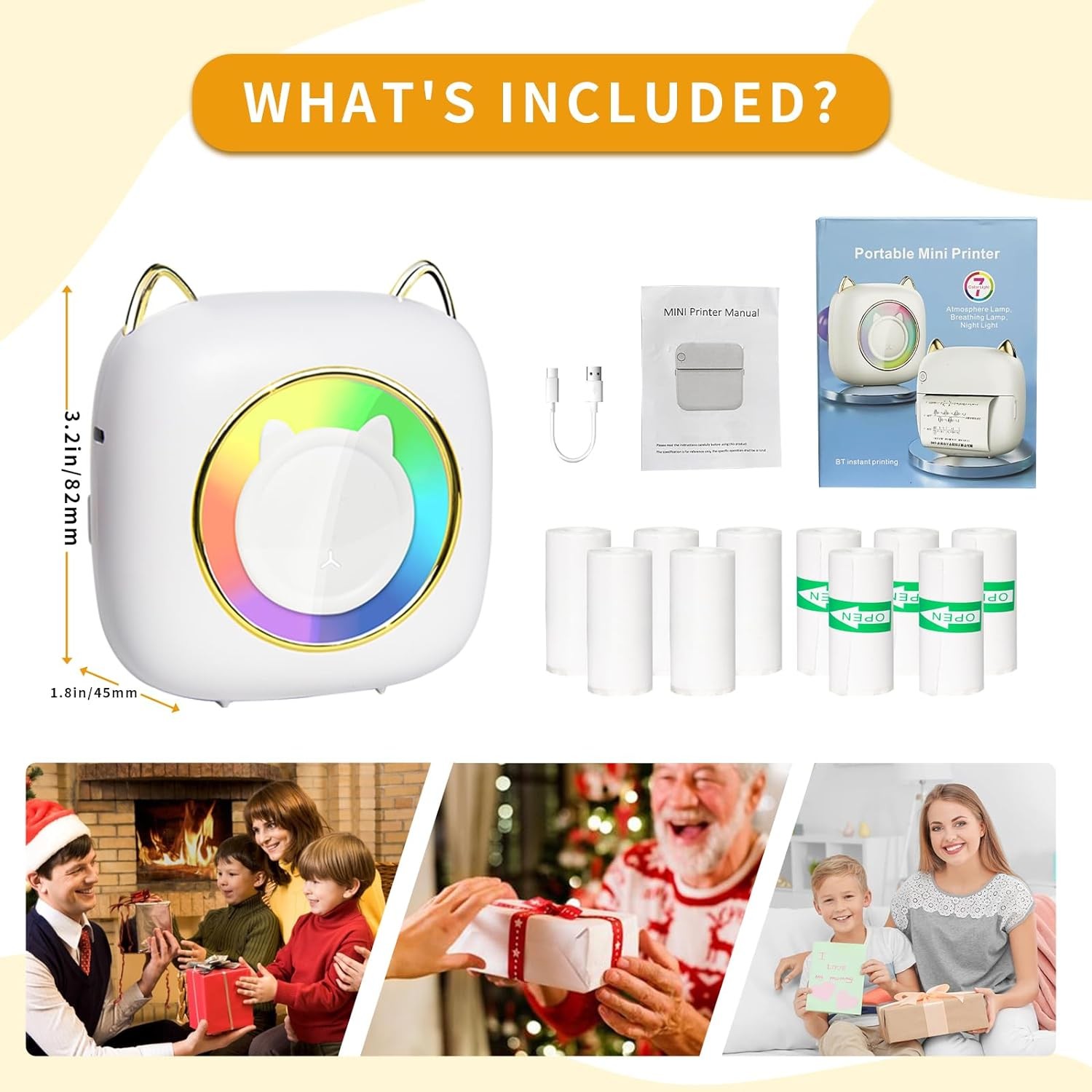
【Unique LED Lights】This mini printer comes with 7 different colors of RGB LED lights, the seven colors flash alternately, which can provide rich lighting effects, the body is designed in the shape of a cat is very cute, like a glowing kitten when you turn on the power, adding more delightful atmosphere to your life.
【Easy and Simple to Use】Mini sticker printer is compatible with IOS and Android system, it is very easy and convenient to use, you can easily use it by connecting Bluetooth. First of all, you can scan and download the "Fun Print" app from the QR code on our manual or search for "Fun Print" on the App Store or Google, download and install it on your phone. Then long press the printer button, turn on your smartphone Bluetooth device, open the "Fun Print" app and click and Portable】Our this portable thermal printer is very compact, size: 9cm x 9cm x 4cm/ 3.54in x 3.54in x 1.57in,weight: 170g/0.37ib, very portable, you can put it in your pocket at any time to use it, whether it's traveling or for daily use, you can carry it around with you, you can print pictures, text, forms, text, incorrect question and so on.
【Suitable for Various Occasions and Groups】The printer is suitable for printing black and white photos, labels, memos, records, notes, QR codes, etc., which can improve the efficiency of your study and workIt is very suitable for various groups of people, such as students, teachers and white-collar workers, etc., and it is a perfect choice for holiday gifts for children, friends, colleagues and Method: Direct Thermal Printing
Light Color: 7 Colors Changing
Resolution: 203dpi
Battery Capacity: 1200mAh
Effective Print Width: 1.88"/48mm
Thermal Paper Size: 2"× φ1.2"/53mm× φ30mm
Require System: Android / iOS
Charging Port: Micro USB 2.0
Power Supply: Lithium Battery
Powerful APP---Fun Print
How to connect the printer via Bluetooth?
1.Download and install the app "fun print" in the App Store or search on Google
2.Turn on the Bluetooth of the mobile phone and long press and hold the printer power button to turn it on.
3.Click: Me>> Connect, search for Bluetooth device: XXXX, pair with it.
4.Select functions on the APP for printing, and click "Print" to print.
Please follow the user guide of thermal label printer to download the relevant APP/driver on your phone.
【What You Will Get】as your choose
1x thermal printer
5 x Rolls Paper
5 x Sticker Paper
1 x Power cord
1 x Instruction manual
or
5 x Sticker Paper only
Item SpecificsBrand :UnbrandedTechnology :Direct ThermalLabel Type :Direct Thermal LabelMaterial :PlasticType :Mini Thermal PrinterOutput Type :Black & WhiteInput Type :ColorConnectivity :BluetoothFeatures :PortableMaximum Resolution :203 x 203 DPIInput Type :ColorConnectivity :BluetoothFeatures :PortableMaximum Resolution :203 x 203 DPI
Payment
[ Policy: The above tab label style can be modified in left Basic - Footer Policy section.
And this area is the details contents of your policies. You can add a banner for this policy as header and add text descriptions here. The text descriptions can be different Font Size, Font Color, Style and even graphics and icons are also accepted. ]
Shipping
[ Shipping: This is the contents of your Shipping. You can add a banner for this Shipping as header and add text descriptions here. The text descriptions can be different Font Size, Font Color, Style and even graphics and icons are also accepted. ]
Returns
[ Return: This is the contents of your Return. You can add a banner for this Return as header and add text descriptions here. The text descriptions can be different Font Size, Font Color, Style and even graphics and icons are also accepted. ]
Contact Us
[ Contact Us: This is the contents of your Contact Us. You can add a banner for this Contact Us as header and add text descriptions here. The text descriptions can be different Font Size, Font Color, Style and even graphics and icons are also accepted. ]
Copyright of XXXX. All rights reserved.