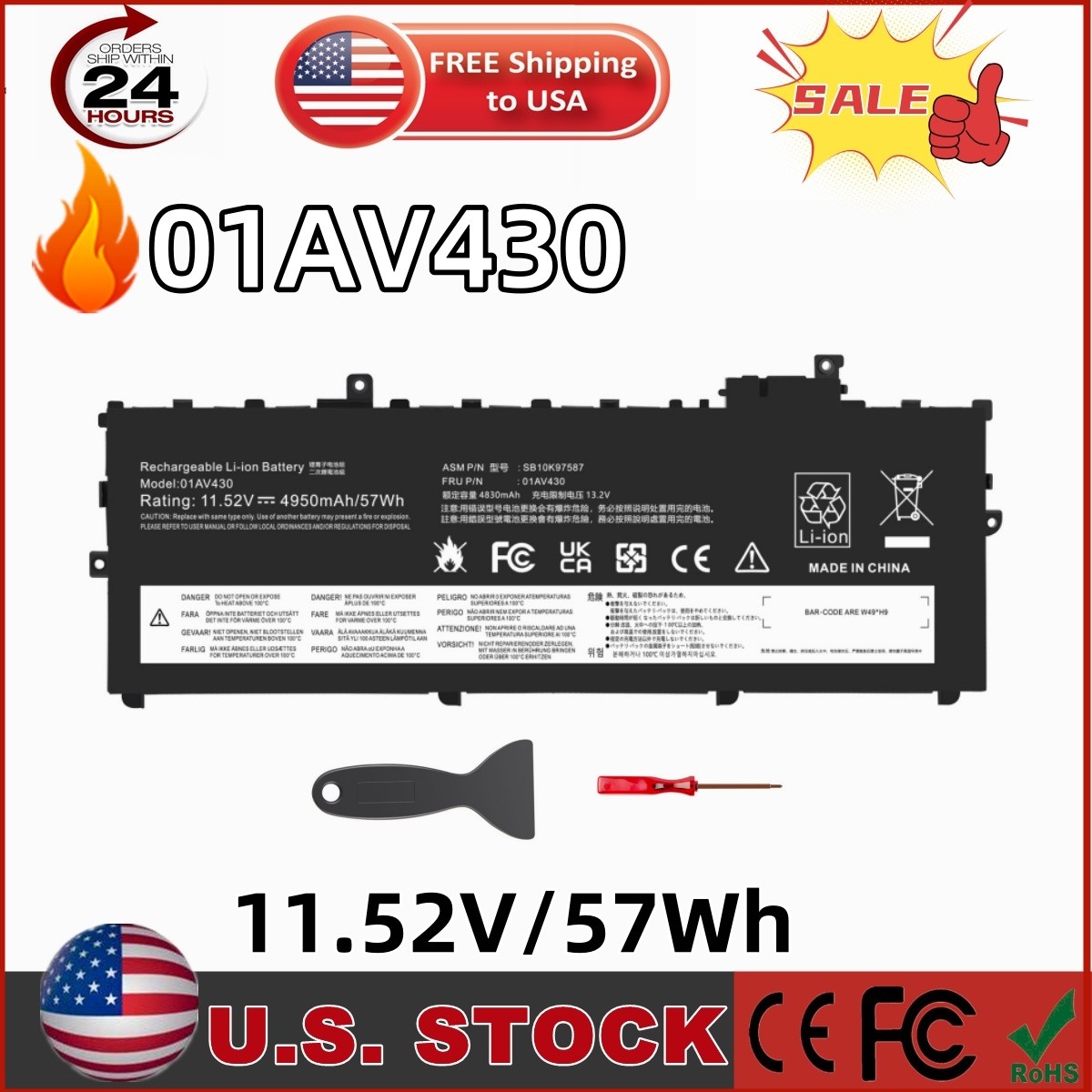
01AV430 Battery For Lenovo 01AV431 01AV494 ThinkPad X1 Carbon 5th 2017 6th 2018
Specification:
Battery cycles:500
Operation time: Around 1.5-3hours
Replacement for Part Number
01AV429 / 01AV430 / 01AV431 / 01AV494
SB10K97586 / SB10K97587 / SB10K97588
Compatible Laptop Models
For Lenovo ThinkPad X1 Carbon 5th Gen (X1 Carbon 2017) Model 20HR000FUS Series
For Lenovo ThinkPad X1 Carbon 6th Gen (X1 Carbon 2018) Model 20KH002FUS 20KH002JUS 20KH002WUS 20KG0022US 20KH002RUS Series
NOTE:
Only fit for X1 Carbon Gen 5 and Gen 6)
(Not fit for X1 Carbon Gen 1, 2, 3, 4, 7, 8)
How to confirm that the battery is suitable for your laptop?
Method 1: Use System Information to find your laptop model
Step 1: Press Windows + R to open Run window.
Step 2: Input "msinfo32" in the empty box and click OK to open System Information.
Step 3: Keep in the System Summary section, and you will find the System Model item in the right pane.
Method 2: Remove Battery from Laptop to find your laptop battery part number
Step 1: Switch off the laptop and unplug the power cable in case of electric shock
Step 2: Remove the back panel with the screwdriver. You should to this with care avoiding any harm to the laptop components.
Step 3: Disconnect the cable connected to the battery and then take out the battery. After that, you can check the specifications of your battery.
Install A New Battery:
- You need to turn off your laptop and disconnect the power.
- Disconnect the connection between the old battery and the motherboard to avoid unnecessary damage caused by disassembling the battery. Then unscrew the old battery screws one by one and carefully save each screw.
- Remove the old battery, carefully install the new battery on the battery case, screw in the screw, and connect the wiring of the new battery.
- If you don't understand the above steps, you can search for the video about laptop battery installation on YouTube. Maybe it will help you
Laptop Battery Instructions:
- Discharge the new battery to 10% (not 0%), then charge(100%) and cycle 3-5 times to wake up the new battery.
- It can calibrate the state of the battery by performing a complete and effective charging and discharging of the battery once a month.
- Charge it to around 50% when you store it long term.
- Do not keep your battery below 5% or deep discharge state (long time 0%), may turn on battery protection and cause the battery to fail to charge.
- Please feel welcomed to notify us of any inconvenience or fault in our battery.
The following are troubleshooting methods:
- Turn off the laptop.
- Unplug AC power.
- Remove the battery.
- Replace AC power.
- Turn on laptop,allow OS to boot.
- Once logged into the machine, perform a normal shut down.
- Unplug AC power.
- Replace battery.
SHIPPINGABOUT be aware that PO Box cannot receive items,please DO NOT fill in the PO Box address.
- DELIVERY DAYS: 3-7 BUSINESS DAYS
- 3 BUSINESS DAYSSHIPPING OUT
- SHIP FROM CA & TX & NJ & GA & NC &OR WAREHOUSE
California Warehouse: City of Industry, CA
Texas Warehouse: Houston, TX
New Jersey Warehouse: Perth Amboy, NJ
New York State Warehouse: Perth Amboy, NJ
Georgia Warehouse: Austell,GA
North Carolina Warehouse: Grove NC
Oregon Warehouse: AIRPORT WAY Portland,OR
ABOUT USWelcome to our store. As a leading and emerging company in manufacturerand exporting business, we are specialized in Business and Industrial Products, Sporting Goods, Pet Products, Home and Garden products for more than 10 years. We believe that it is our vision and mission to provide innovative products with best service and competitive price to satisfy you. Our goal is to make sure that you can find exactly what you are looking for and make it easy for you to place your orders.PAYMENT
- We accept PayPal payment,PayPal Credit,Credit card or debit card and so on.
- Payment should be completed within 4 (Four) days of sale closing. Or unpaid dispute will be filed for closing sale.
- We will leave a positive response immediately after payment is received. We appreciate a positive response as much as you do. If for some reason there is any issue with the purchase, please contact us prior to leaving response, we will be glad to work together and provide a satisfying solution.
RETURNS
- All of our items are backed with a 30-day return policy. We ensure all our items are new and in excellent condition prior to shipping. In case you receive the item that is not to the standards above, please contact us via e-Bay messages. All returns must be in new original condition as received and should be shipped with delivery confirmation
- Please note that all returns must be pre-approved by us. Unauthorized returns will not be accepted. If you need to return, please check twice to confirm the item not work and contact our customer service representative, let us know the detailed problem and send us some pictures for confirmation.
- We ONLY accept returns with original package. Please make sure that item has NO man-made sabotage. Used items will not be accepted for return.
CONTACT
- Email Customer Support:
- 9:00am-2:00am PST Sunday-Friday
- All emails will be responded to within 12-24 hours