When you click on links to various merchants on this site and make a purchase, this can result in this site earning a commission. Affiliate programs and affiliations include, but are not limited to, the eBay Partner Network. When you click on links to various merchants on this site and make a purchase, this can result in this site earning a commission. Affiliate programs and affiliations include, but are not limited to, the eBay Partner Network.
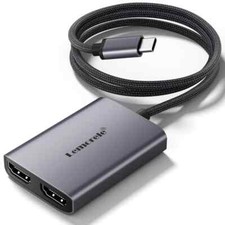
Lemorele 4K HDMI to USB-C AR Glasses Video Adapter & Power Converter Connect your AR smart glasses to game consoles, desktop PCs, and media players with the Lemorele 4K HDMI to USB-C Active Video Adapter. Specifically engineered for XREAL, Rokid, VITURE, and RayNeo AR glasses, this converter bridges the gap between standard HDMI video outputs and USB-C DisplayPort devices while delivering continuous auxiliary power. TECHNICAL SPECIFICATIONS & DESIGN HIGHLIGHTS: ULTRA-HD 4K@60Hz VIDEO PERFORMANCE: Converts digital HDMI video feeds to crystal-clear USB-C display signals with up to 4K@60Hz and 1080P@120Hz support for fluid, lag-free gaming and cinematic viewing. TAILORED FOR LEADING AR / XR GLASSES: Fully tested and optimized for XREAL (Nreal) Air / Air 2 Pro, Rokid Max / Air, VITURE One / Pro, and RayNeo AR headsets. DEDICATED POWER INJECTION: Equipped with an auxiliary USB-C power port ($5\text{V}/2\text{A}$) to supply the steady electrical current required to drive AR micro-OLED displays at maximum brightness. BROAD HDMI SOURCE COMPATIBILITY: Connects seamlessly to Nintendo Switch (in dock), Sony PS5 / PS4, Xbox Series X/S, Steam Deck docks, desktop graphics cards, and laptops. PREMIUM CNC ALUMINUM ALLOY CASING: Sturdy metallic housing provides rapid thermal heat dissipation during extended gaming or movie sessions and shields against signal interference. 100% SOLDERLESS PLUG-AND-PLAY: Zero software, drivers, or complicated configurations required—simply connect your cables, plug in power, and enjoy instant big-screen visuals.
IMPORTANT USAGE & CONNECTION NOTES: Directional Signal: This is a Uni-Directional adapter converting HDMI Output (Host) $ightarrow$ USB-C Input (Display / Glasses). It will NOT work in reverse (cannot connect a USB-C laptop to an HDMI monitor). Power Requirement: Always connect the included USB-C power cable to a $5\text{V}/2\text{A}$ USB power source (wall charger, power bank, or powered USB port) to ensure your AR glasses turn on. Audio for XREAL: On XREAL glasses, ensure your firmware is up-to-date and long-press the "Brightness / Volume +" button until you hear two beeps to switch to the HDMI audio channel if required.
 |
|