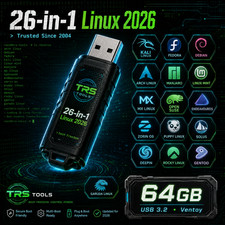
TRS TOOLS | PLUG • FIX • DONETHE NEXT LEVEL OF LINUX EXPLORATIONTHE ULTIMATE
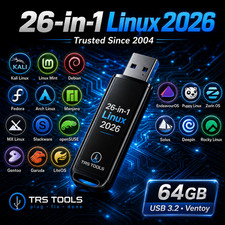
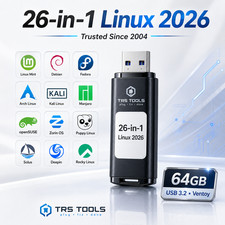
LINUX MULTIBOOT USB26 BOOTABLE SYSTEMS • ONE USB DRIVE
64GB USB 3.2 | MULTIBOOT COLLECTION | PHYSICAL DELIVERYONE USB. A WORLD OF POSSIBILITIES.
Experience the flexibility of exploring multiple Linux distributions and specialized computing environments without having to prepare each USB image individually.
TRS Tools brings together a carefully organized multiboot collection on one prepared 64GB USB 3.2 drive, packaged and shipped directly to you.
PHYSICAL USB INCLUDED — NOT A DIGITAL DOWNLOADTHE MULTIBOOT ADVANTAGEMULTIPLE SYSTEMS
Explore a diverse selection of Linux and specialized operating environments from one prepared USB.
ORGANIZED BOOT MENU
Conveniently select between prepared boot entries on compatible computer hardware.
LIVE BOOT EXPLORATION
Explore supported live environments without necessarily installing an operating system.
TECH EDUCATION
Useful for students, computer technicians, Linux enthusiasts, and hands-on learning.
EXPLORE THE COLLECTION
DISCOVER & EXPLORE
CUSTOMIZE YOUR EXPERIENCE
EXPAND YOUR TECH KNOWLEDGE
EXPERIMENT & LEARN
MORE SYSTEMS TO DISCOVER
WHAT'S INCLUDED WITH YOUR ORDER?Physical Media1 prepared 64GB USB 3.2 driveMultiboot SetupOrganized multiboot configurationSoftware CollectionAdvertised 26 bootable system selectionsQuick StartBasic guidance for USB bootingPreparationPrepared, checked, packaged, and shipped by TRS ToolsBUILT FOR THE CURIOUS & TECH-SAVVY
Whether you're taking your first steps into Linux or already have experience experimenting with operating systems, this prepared collection offers a practical way to explore different computing environments.
✓ Linux beginners and hobbyists
✓ Computer technicians and IT professionals
✓ Students and technology learners
✓ Open-source software enthusiasts
✓ Desktop environment exploration
✓ Hardware compatibility testing
✓ Virtualization and technical education
✓ Authorized security learning and researchGET STARTED IN FIVE STEPS
01 — CONNECT
Insert the prepared USB into a compatible computer.
02 — RESTART
Restart or power on the computer.
03 — OPEN BOOT MENU
Access the computer's boot device selection menu.
04 — SELECT USB
Choose your USB device from the available boot options.
05 — EXPLORE
Select an available operating system or technical environment and follow the startup instructions.
WHY BUY FROM TRS TOOLS?REAL EXPERIENCE. REAL PREPARATION.
Backed by 30+ years of hands-on IT experience and more than 20 years of selling history, TRS Tools focuses on providing convenient prepared physical media, practical organization, and attentive buyer service.
PREPARED • ORGANIZED • CHECKED • PACKAGED • SHIPPED
Our goal is to provide a practical product experience, clear information, and helpful communication before and after your purchase.
THE VALUE OF PREPARED PHYSICAL MEDIA
This collection is designed for buyers who prefer receiving an organized physical USB rather than preparing multiple boot images independently.
Our preparation service includes organizing the multiboot environment, preparing the media, checking the USB, handling, packaging, and physical shipment.
Third-party software remains subject to its original licensing terms. The service value comes from the preparation, organization, physical media, and fulfillment.
IMPORTANT COMPATIBILITY NOTES
This USB is intended for compatible computers that support booting from USB devices. Compatibility is not guaranteed with every computer or every included operating system.
Compatibility may depend on:
- UEFI or Legacy BIOS support
- Secure Boot and firmware settings
- Available system memory and storage
- Graphics hardware and device drivers
- Individual operating system requirements
- Boot mode and installer compatibility
Some operating systems may require internet access, configuration changes, or installation to internal storage. Installing an operating system can overwrite existing data. Back up important files before making system changes.
FREQUENTLY ASKED QUESTIONS
Q: Is this a physical item?
Yes. You receive a prepared USB drive shipped as a physical product. This is not a digital download.
Q: Can I try Linux before installing it?
Many Linux distributions provide live boot functionality, depending on the selected system and computer compatibility. Others may require installation or additional setup.
Q: Does it work on every laptop or desktop?
No. Your computer must support USB booting and meet the requirements of the selected operating system.
Q: Do I receive software activation codes?
No activation codes, commercial license keys, or retail software licenses are included.
Q: Will I receive a retail software box?
No retail box is included unless specifically stated. Product illustrations and packaging-style graphics are for visual presentation.
Q: Is TRS Tools affiliated with the Linux developers?
No. TRS Tools is an independent physical media preparation seller and is not sponsored by or officially affiliated with the included third-party projects.
Q: Can I contact you for assistance?
Yes. Please message us through if you have questions about the product, included contents, or USB booting.
OPEN-SOURCE SOFTWARE & LICENSING
The included third-party software and operating systems are subject to their respective license terms. Some components are licensed under the GNU General Public License (GPL) or other open-source licenses, while certain projects may have additional terms covering redistribution, components, trademarks, or documentation.
TRS Tools does not claim ownership of any third-party operating systems or software. All respective copyrights, trademarks, and software names remain with their original owners.
TRS Tools is not affiliated with, sponsored by, or endorsed by the included projects or developers. The listing describes physical media preparation, organization, handling, packaging, and shipping.
No retail software license, commercial activation key, or activation code is included.
PRODUCT IMAGE & PACKAGING DISCLAIMER
QUESTIONS? WE'RE HAPPY TO HELP.
Have questions about compatibility, the included systems, or how to get started?
We appreciate your business and aim to provide helpful customer service.
TRS TOOLSPLUG • FIX • DONE
Thank you for choosing TRS Tools!