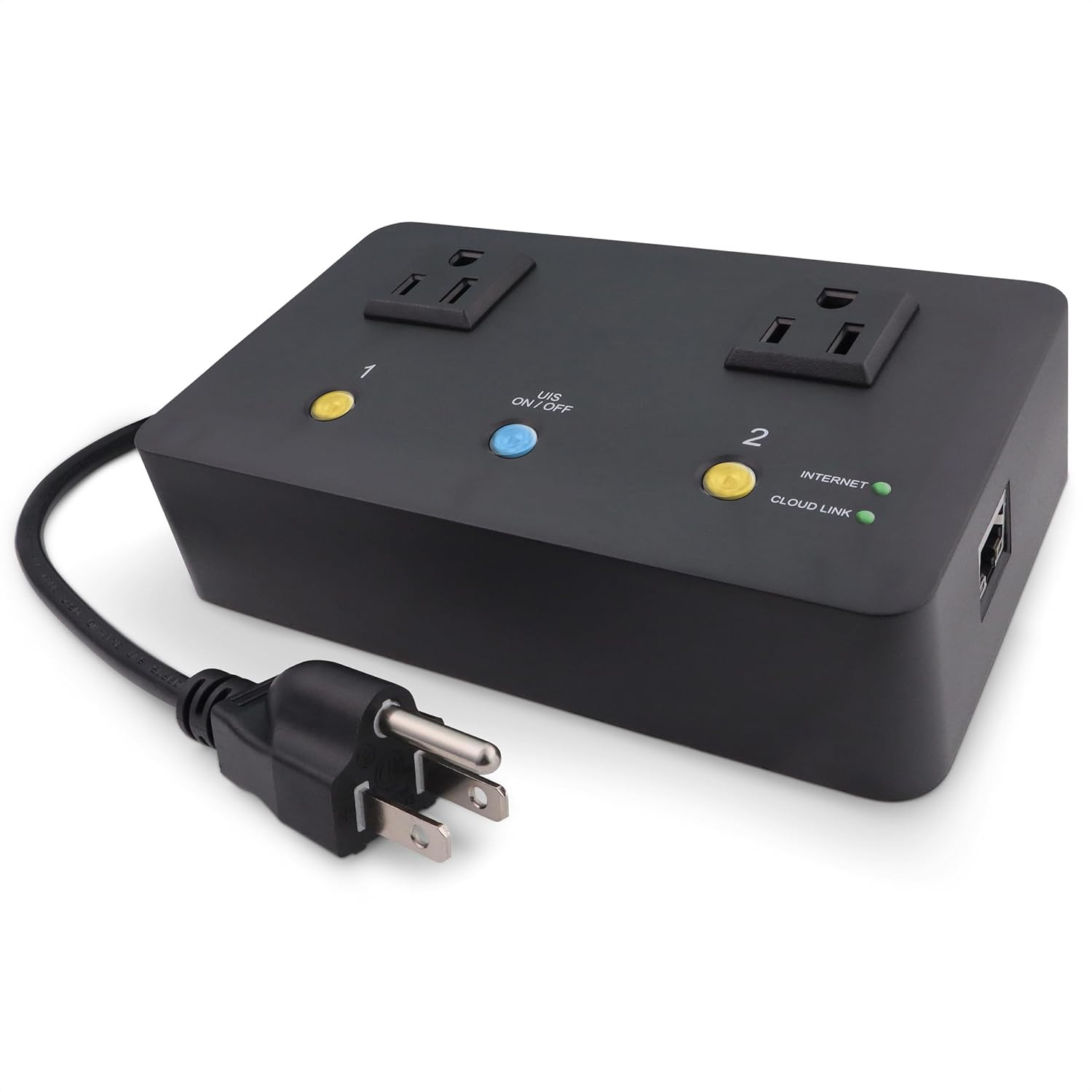
Product description MSNSwitch2 Internet Enabled IP Remote Power Switch with Automatic Reboot - Control via Smartphone App or Web
Model UIS-722b is identical to Model UIS-622b but with a faster CPU.
MSNSwitch2 can power-cycle any device when Internet connectivity is lost. This remotely controlled AC power switch can automatically reboot your modem or router without anyone present.
MSNSwitch2 will automatically ping up to 7 different preset targets, which can be changed - if they are unreachable, MSNSwitch2 will power-cycle one or both AC outlets. Power cycles can also be scheduled in advance. Plus, you can control everything from your smartphone!
MSNSwitch2 is a must have for remote site equipment - Pays for itself with just 1 saved site visit!
Enterprise Grade Features
- One press protect, no Internet setup required - Functional out of the box!
- Maintain a continuous Internet connection by resetting power outlets when Internet freezes
- Option to PING LAN IP or WAN IP
- Scheduled Outlet Power Cycles - 20 On/Off at Day/Time events
- Countdown Power-Cycling - Automatically power cycle outlet power every X mins (1-1440)
- Heartbeat Monitoring - Reset one or both outlets if the MSNSwitch does not receive a heartbeat packet
- Dynamic DNS Support & Remote Admin
- Event Log & EMail Alerts – Notify multiple users of various events
- Advanced Network Configuration – DHCP or static IP address, DNS servers and HTTP/HTTPS web admin interface port
- Save/Restore Configuration - Easily copy the configuration to multiple units
Typical MSNSwitch2 Network Setup to Restart a Modem or Router when the Internet Locks Up HOW IT WORKS
- Plug the MSNSwitch's power cord into a wall outlet or UPS
- Plug your modem & router power adapters into the MSNSwitch,typically with the modem in Outlet #1
- Plug an Ethernet cable between the MSNSwitch and your router
- Press and hold the UIS button on the center top of the MSNSwitch until the the button glows blue
- Now when the MSNSwitch detects that it cannot access the Internet, it will cycle power to your modem & router
You can also use the ezDevice app, Cloud4UIS web site, or the MSNSwitch's internal web server to adjust various settings to meet your needs such as changing how many times the MSNSwitch will restart a device, how long it takes to determine an Internet outage, or to schedule regular on-off cycles.
4 Ways to Monitor Status, Control Outlets & Configure the MSNSwitch Free ezDevice APP
ezDevice is a free smartphone app for Android and Apple iOS that can contol and manage multiple MSNSwitches (and ezOutlet's) from a single screen. Download it from your app store.
Free Cloud4UIS.com Web Service
The free Cloud4UIS.com web service works in conjunction with MSNSwitch to allow management of your devices from any web browser. It is also integrated with Google Home.
Embedded Web Server
The MSNSwitch's internal web server provides full access to all of the MSNSwitch's settings and advanced features.
RESTful Programming API
Use your favorite programming tools to communicate with the MSNSwitch via a simple HTTP-based API.
Includes Free Subscription to the Cloud4UIS Multiple Device Remote Management Platform MSNSwitch2 is Ideal For:
- Small Office or Home xDSL, Cable or 4G/5G Modem Users
- IT Professionals
- System Integrators
- Internet or VoIP Service Providers
- Kiosks or ATM Providers
- Vending Machine or Commercial Digital Displays
See the Installation Guide PDF file in the Technical Specification section of this listing for examples of the 7 ways to control the MSNSwitch.
Specifications Model # UIS-722b Input Voltage Range 100~250 VAC, 50/60Hz - Output Voltage Matches Input Voltage Max Output Current 10A combined across both outlets Input Plug / Output Sockets Type B (US) NEMA 5-15R Fuse Type T10AH250V Ceramic Slow Blow 5x20 mm (1 spare fuse included in power inlet port) Network 10/100 Base-T, RJ45 Operating Conditions 0~60C at 10~90% RH Environmental Rating IP20 Dimensions 6.3 x 3.75 x 1.58 in (160x95x40 mm) Languages Supported English, Spanish, Chinese (Traditional), Portuguese (Brazilian), Italian, German Package Includes MSNSwitch2, Ethernet Cable, User Guide Add to Cart Add to Cart Add to Cart Add to Cart Customer Reviews 4.3 out of 5 stars 92 4.3 out of 5 stars 323 3.9 out of 5 stars 27 — Price $113.95$113.95 $91.95$91.95 $96.95$96.95 $312.95$312.95 Model # UIS-722b EZ-72b EZ-73a UIS-801bc # Outlets 2 1 2 2 Connectivity Ethernet Ethernet & WiFi Ethernet & WiFi Ethernet & WiFi Status LEDs LEDs OLED Display LEDs Max Current 10A 10A 2.5A 15A (13A Continuous) Voltage 100-240 VAC @ 50/60 Hz 100-240 VAC @ 50/60 Hz 125 VAC @ 50/60 Hz 100VAC - 125VAC @ 50/60Hz Plug/Receptacle 2x 3-Prong NEMA 5-15 1x 3-Prong NEMA 5-15 2x 2-Prong NEMA 2-15 2x 3-Prong NEMA 5-15 Cloud Management ✓ ✓ ✓ ✓ Event Log / Email Notifications ✓ no data no data ✓ IP's Monitored up to 7 1 1 up to 7
- Monitors Internet Connectivity and Automatically Cycles One or Both Outlets When Connection is Lost + User Definable Scheduled Power Cycling
- Functional Out of the Box - Single Button Press Enables Auto Reset Function with Settings Appropriate for Most Situations
- Automatically Control and Reboot any Remote Electrical Equipment such as Computers, Modems, Routers, DVRs, PLCs, Industrial Computers, etc.
- Configure & Control Remotely Over the Internet via ezDevice Smartphone App, Cloud4UIS Web Service, any Web Browser or its API
- Pings Multiple Internet Sites to Determine Online Status - User Definable Targets & Fault Tolerance