When you click on links to various merchants on this site and make a purchase, this can result in this site earning a commission. Affiliate programs and affiliations include, but are not limited to, the eBay Partner Network. When you click on links to various merchants on this site and make a purchase, this can result in this site earning a commission. Affiliate programs and affiliations include, but are not limited to, the eBay Partner Network.
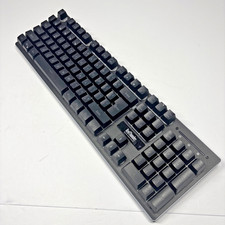
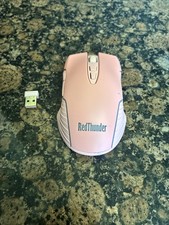
RedThunder USB Receiver for RedThunder G60, K10, K62, K84 Wireless Keyboard and Mouse - Compatible Models: RedThunder G60 One-Handed Wireless Keyboard, K10 Wireless Keyboard & Mouse Combo, K62 Wireless Keyboard & Mouse Combo, K84 Wireless Keyboard & Mouse Combo
- ⚠️ Important Notes Before Pairing Power Check: Ensure your keyboard and mouse have sufficient battery power. Signal Stability: Keep the device and USB receiver within 10 cm, with no obstacles between them. Avoid Interference: Keep away from 2.4GHz interference sources (e.g., Wi-Fi routers, Bluetooth devices). Receiver Preparation: Do not plug the USB receiver into your computer until instructed in the pairing steps.
- Keyboard Pairing Steps For K10 / K62 / K84 Keyboard (Keep the mouse power switch OFF during this process) Slide the keyboard's power switch to ON. Press and hold the Esc key and the K key simultaneously. The keyboard indicator light will start flashing. Wait for 3–5 seconds, then plug the USB receiver into your computer. The pairing is complete when the indicator light stops flashing and the keyboard functions normally.
- For G60 One-Handed Keyboard (Keep the mouse power switch OFF during this process) Slide the keyboard's power switch to ON. Press and hold the Esc key and the Q key simultaneously. The keyboard indicator light will start flashing. Wait for 3–5 seconds, then plug the USB receiver into your computer. The pairing is complete when the indicator light stops flashing and the keyboard functions normally.
- 🖱️ Mouse Pairing Steps (Keep the keyboard power switch OFF during this process) Slide the mouse's bottom switch to LED mode. Press and hold the mouse wheel and the right mouse button simultaneously. The mouse RGB lights will start flashing. Wait for 3–5 seconds, then plug the USB receiver into your computer. The pairing is complete when the RGB lights stop flashing and the mouse functions normally.
- ✅ Troubleshooting Pairing failed: Repeat the pairing steps, ensuring the other device (keyboard/mouse) is powered off and the receiver is unplugged. Double-check the shortcut keys (Esc+K or Esc+Q). Intermittent connection: Move the receiver closer to the device, remove obstacles, or relocate away from Wi-Fi/Bluetooth devices. No response: Check the battery level of the keyboard/mouse and ensure the receiver is firmly plugged into a working USB port.
RedThunder USB receiver for RedThunder G60, K10, K62, K84 Wireless keyboard and mouse Shipping All U.S. orders include complimentary shipping, and free shipping is also available to select international locations(see the Shipping section of the listing for destination-specific details). The stated handling time appears at the top of the listing page. Orders are shipped via major carriers based on the most appropriate service for the shipment. Storepickup is currently not offered. Where applicable, combined international shipping options may be provided.
Return - You can return a product for up to 30 days from the date you purchased it.
- Any product you return must be in the same condition you received it and in the original packaging. Please keep the receipt.
Payment
We accept payments.
response
Customer satisfaction is very important to us.
If you have any problem with your order, please contact us and we will do our best to make you satisfied.
Contact Us If you have any queries, please contact us via . We usually respond within 24 hours on weekdays. Please visit our store to check out other items for sale! Thank you for shopping at our store.  |
|