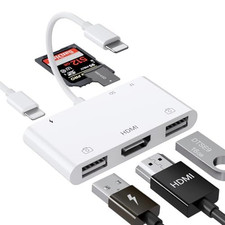
4-in-1 Memory Card Reader View, transfer and back up photos wherever you go USB-A • USB-C • Lightning Connector • Micro-USB One Compact Reader. Multiple Devices. Four built-in connectors
Connect to compatible phones, tablets, laptops and desktop computers. SD and microSD/TF card slots
Access photos, videos, audio and documents stored on common memory cards. Useful for outdoor cameras
Check files from digital cameras, trail cameras, dash cameras, action cameras and drones. Compact travel design
Folding connectors help keep the reader portable and ready for work, travel or outdoor use. Four Connection Options USB-A
Computers and laptops USB-C
Compatible mobile devices Lightning
Compatible phones and tablets Micro-USB
Compatible Android devices Made for Photos on the Move Trail-camera viewing: Review wildlife images without carrying a computer. Photography: Import camera photos to a compatible phone or tablet. Travel backup: Move files between a memory card and compatible device. Computer access: Use the USB-A connector with a compatible laptop or desktop. Please Check Before Ordering Connector: Confirm which connection your device uses. Phone case: Thick or bulky cases may prevent full connector insertion. Android: Your device must support OTG; OTG may need to be enabled in Settings. Lightning devices: A compatible file-management application may be required. Memory-card format: FAT32 or exFAT is recommended for broad compatibility. Product Features
- Four built-in device connectors
- Full-size SD memory-card slot
- microSD/TF memory-card slot
- Supports common photo, video, audio and document formats
- Portable folding connector design
- Suitable for camera and outdoor memory-card viewing
- Charging/input port for supported device configurations
- Black card-reader body
Quick Start Guide 1 Insert one compatible SD or microSD/TF card. 2 Select the correct connector for your device. 3 Connect the reader firmly and remove thick cases if necessary. 4 Open your device’s file manager, photo import tool or required compatible app. 5 Copy files safely and eject the card before removing the reader. Buyer Questions & Answers Q: Why is the reader not detected?
A: Reconnect it firmly, remove a thick phone case, unlock the device and confirm that you selected the correct connector. Android users should also check OTG settings. Q: Does it require an app?
A: USB-C, Micro-USB and USB-A devices can generally use their built-in file manager. Some Lightning-equipped devices may require a compatible file-management app. Q: Why can’t my Android phone see the card?
A: The phone must support USB OTG. Enable OTG in Settings when available, then reconnect the reader. Q: Which card formats work best?
A: FAT32 and exFAT provide broad compatibility. Back up your files before reformatting because formatting erases the card. Q: Can it read SD and microSD cards?
A: Yes. It has separate slots for a full-size SD card and a microSD/TF card. Use one card at a time unless your device specifically supports otherwise. Q: Why is file transfer slower than expected?
A: Speed depends on the connector, device, memory card rating, file size and number of files being transferred. Q: Can I use it with a protective phone case?
A: Many slim cases are suitable, but thick, rugged or bulky cases may need to be removed for a secure connection. Q: Can the phone charge while reading a card?
A: The reader includes a charging/input port, but simultaneous charging support depends on the connected device, connector and power source. Package Contents 1 × Black 4-in-1 Memory Card Reader Memory cards, phone, camera and other devices shown are for demonstration only and are not included.