Yealink WPP30 4K Wireless Presentation Pod USB-C WiFi 6 BYOD (NEW In Box)The Yealink WPP30 is a wireless presentation pod that casts a laptop screen to a paired Yealink room system over WiFi. The pod plugs into a laptop USB-C port, pairs with the room system, and a single button press starts and stops sharing. Because the pod carries its own hardware encoder, no software installation is required on the host machine when connected by USB-C.The WPP30 also supports wireless BYOD, presenting the room system camera, microphone and speaker to the laptop over WiFi as USB peripherals, so the laptop can host the meeting in its own conferencing application. It adds reverse touch control, annotation and whiteboarding, and up to four way split screen. The radio is Wi-Fi 6 with 2x2 MIMO on 2.4 GHz and 5 GHz plus Bluetooth 5.0, and casting runs at up to 4K at 30 frames per second over USB-C, falling back to 1080p at 30 frames per second through the supplied USB-A adapter.SpecificationsBrand: YealinkModel: WPP30 Wireless Presentation PodPart Number: WPP30Alternate Part Number: 1303112Product Type: Wireless presentation and BYOD podConnector: 1 x full featured USB Type-C, USB-C to USB-A adapter suppliedWireless: Wi-Fi 6, 802.11 a/b/g/n/ac/ax, 2x2 MIMO, 2.4 GHz and 5 GHzBluetooth: 5.0Maximum Casting Resolution: Up to 4K at 30fps over USB-C, up to 1080p at 30fps via the USB-A adapterBYOD Video: 1080p at 30fpsPower: Bus powered, 5 V at 600 mA, 2.2 W typicalControls: 1 x start and stop buttonIndicators: 3 LEDs for 4K/UHD, system error and system statusDimensions: 220 mm x 38 mm x 16 mmNet Weight: 75 gOperating Temperature: -10 to 40 degrees COperating Humidity: 0 to 95 percent, non condensingCompatibility: Yealink MeetingBar A10, A20 and A30, MeetingBoard 65 and 86, MVC320 and MVC400, maximum 4 pods per systemHost OS: Windows and macOSBarcode: 841885108852Country of Origin: ChinaCondition: New, in the original boxKey Features One button wireless screen sharing with no software to install over USB-C Hardware encoder casting at up to 4K at 30 frames per second Wi-Fi 6 with 2x2 MIMO on both 2.4 GHz and 5 GHz Wireless BYOD, so a guest laptop can use the room camera, microphone and speaker Annotation, whiteboarding and reverse touch control Up to four way split screen from multiple pods Typical Applications Cable free presenting in meeting rooms and boardrooms Guest and contractor laptops that cannot install client software Rooms already running a Yealink MeetingBar or MeetingBoard Adding a second or third sharing pod to a busy meeting space Package Includes 1 x Yealink WPP30 wireless presentation pod 1 x USB-C to USB-A adapter 1 x Quick Start Guide No room system or display is included Additional InformationThe WPP30 is an accessory and does not function on its own. It must be paired with a compatible Yealink room system from the list above. It is not supported on the larger MVC640, MVC660 or MVC940 systems, which use the WPP20 instead.Yealink has issued an end of sale notice for the WPP30 in the United States market and positions the PA20 as its successor. Yealink does not publish the length of the integral USB-C tail, so that figure is not stated here.The item is new in the manufacturer's original packaging.Shipping from Sydney, Australia. Yealink WPP30 4K Wireless Presentation Pod USB-C WiFi 6 BYOD (NEW In Box)
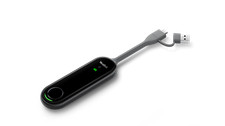
The Yealink WPP30 is a wireless presentation pod that casts a laptop screen to a paired Yealink room system over WiFi. The pod plugs into a laptop USB-C port, pairs with the room system, and a single button press starts and stops sharing. Because the pod carries its own hardware encoder, no software installation is required on the host machine when connected by USB-C.
The WPP30 also supports wireless BYOD, presenting the room system camera, microphone and speaker to the laptop over WiFi as USB peripherals, so the laptop can host the meeting in its own conferencing application. It adds reverse touch control, annotation and whiteboarding, and up to four way split screen. The radio is Wi-Fi 6 with 2x2 MIMO on 2.4 GHz and 5 GHz plus Bluetooth 5.0, and casting runs at up to 4K at 30 frames per second over USB-C, falling back to 1080p at 30 frames per second through the supplied USB-A adapter.
Specifications
Brand: Yealink
Model: WPP30 Wireless Presentation Pod
Part Number: WPP30
Alternate Part Number: 1303112
Product Type: Wireless presentation and BYOD pod
Connector: 1 x full featured USB Type-C, USB-C to USB-A adapter supplied
Wireless: Wi-Fi 6, 802.11 a/b/g/n/ac/ax, 2x2 MIMO, 2.4 GHz and 5 GHz
Bluetooth: 5.0
Maximum Casting Resolution: Up to 4K at 30fps over USB-C, up to 1080p at 30fps via the USB-A adapter
BYOD Video: 1080p at 30fps
Power: Bus powered, 5 V at 600 mA, 2.2 W typical
Controls: 1 x start and stop button
Indicators: 3 LEDs for 4K/UHD, system error and system status
Dimensions: 220 mm x 38 mm x 16 mm
Net Weight: 75 g
Operating Temperature: -10 to 40 degrees C
Operating Humidity: 0 to 95 percent, non condensing
Compatibility: Yealink MeetingBar A10, A20 and A30, MeetingBoard 65 and 86, MVC320 and MVC400, maximum 4 pods per system
Host OS: Windows and macOS
Barcode: 841885108852
Country of Origin: China
Condition: New, in the original box
Key Features
- One button wireless screen sharing with no software to install over USB-C
- Hardware encoder casting at up to 4K at 30 frames per second
- Wi-Fi 6 with 2x2 MIMO on both 2.4 GHz and 5 GHz
- Wireless BYOD, so a guest laptop can use the room camera, microphone and speaker
- Annotation, whiteboarding and reverse touch control
- Up to four way split screen from multiple pods
Typical Applications
- Cable free presenting in meeting rooms and boardrooms
- Guest and contractor laptops that cannot install client software
- Rooms already running a Yealink MeetingBar or MeetingBoard
- Adding a second or third sharing pod to a busy meeting space
Package Includes
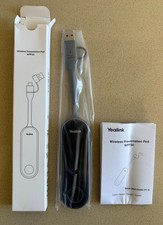
- 1 x Yealink WPP30 wireless presentation pod
- 1 x USB-C to USB-A adapter
- 1 x Quick Start Guide
- No room system or display is included
Additional Information
The WPP30 is an accessory and does not function on its own. It must be paired with a compatible Yealink room system from the list above. It is not supported on the larger MVC640, MVC660 or MVC940 systems, which use the WPP20 instead.
Yealink has issued an end of sale notice for the WPP30 in the United States market and positions the PA20 as its successor. Yealink does not publish the length of the integral USB-C tail, so that figure is not stated here.
The item is new in the manufacturer's original packaging.
Shipping from Sydney, Australia.
× × × × × ×
Buy now and save! Shipping info
Click the Shipping & Payments tab above the listing description for more info
Click the Shipping & Payments tab above the listing description for more info!
Additional delivery notes
PICK UP OPTION
Sorry, our items are NOT available for pick-up.
PAYMENT
Immediate payment is required upon selecting "Buy It Now" or upon checking out through the cart.
We accept payment via All Major Credit Cards (Visa, Mastercard, AMEX, Discover), Google Pay, PayPal, & Apple Pay (on mobile & App).
Thank you for shopping with us on !
Additional Information
No additional information at this time
Ask seller a question
You might also like BRADY Y67771 Ball Valve Lockout 65669 Large 9/32" Steel 32-76mm (NEW In Box) RedLine RL-DR3-B Blue DR3 LED 3W Perimeter Light Head RedFleet (NEW In Box) RedLine RL-DR3-R Red DR3 LED 3W Perimeter Light Head RedFleet (NEW In Box) RedLine RL-DR4-M Magenta DR4 LED 4W Perimeter Light Head RedFleet (NEW In Box) Contact
To contact our Customer Service Team, simply click the button here and our Customer Service team will be happy to assist.
Ask seller a question
© My Store
Shipping & Payments
Click the Shipping & Payments tab above the listing description for more info
Payment
Accepted Payment Methods
Immediate payment is required upon selecting "Buy It Now" or upon checking out through the cart.
We accept payment via All Major Credit Cards (Visa, Mastercard, AMEX, Discover), Google Pay, PayPal, & Apple Pay (on mobile & App).
Thank you for shopping with us on !
Returns
Returns are accepted
Items must be returned within 30 days of the sale ending
Buyer will pay for return shipping.
integration by